Learn how to create and select characters in Equinox Roleplay, customize your appearance and selection screen, choose a spawn, and keep character stories separate.
The Character Creation system is where you create a new identity or choose an existing character before entering Equinox Roleplay.It includes character slots, appearance customization, a personalized selection screen, and spawn selection. Each character has their own identity and story, so it’s worth understanding the options before getting started.
First time connecting? You’ll be guided through creating your first character. If you’ve played before, you’ll normally arrive at the Character Selection screen.
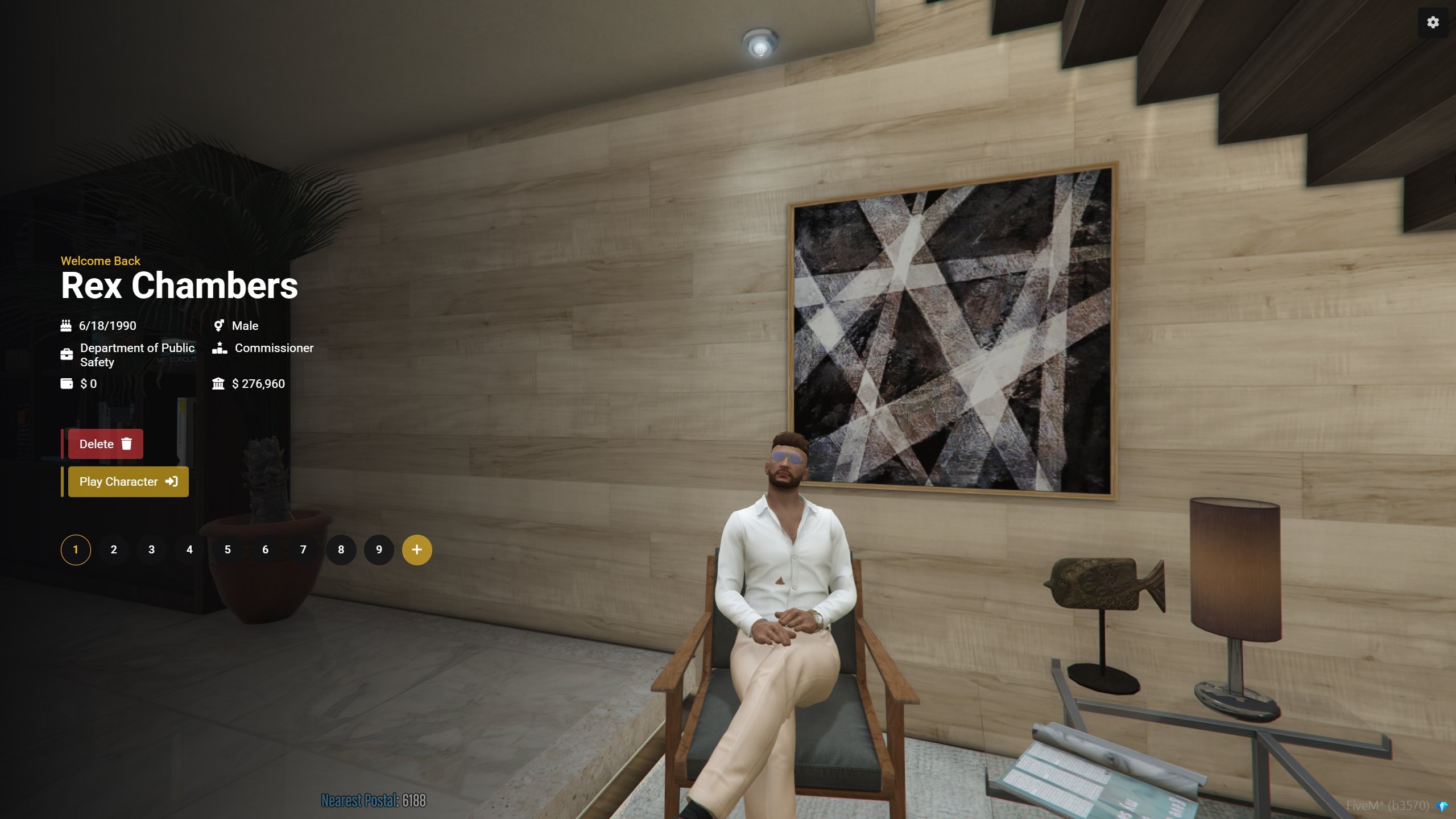
Character Selection
The Character Selection screen displays the characters available on your account. Choose the character you want to play to continue their story.
Character Selection
Character Slots
Every player starts with 3 character slots. A slot allows you to create and maintain a separate character.
Feature
Details
Standard slots
3 per player
Additional slots
Optional, available through the Equinox store
Character selection
Choose which existing character to play when connecting
Character separation
Each character has their own identity, experiences, and knowledge
You do not need additional slots to begin playing. Three slots are included by default.
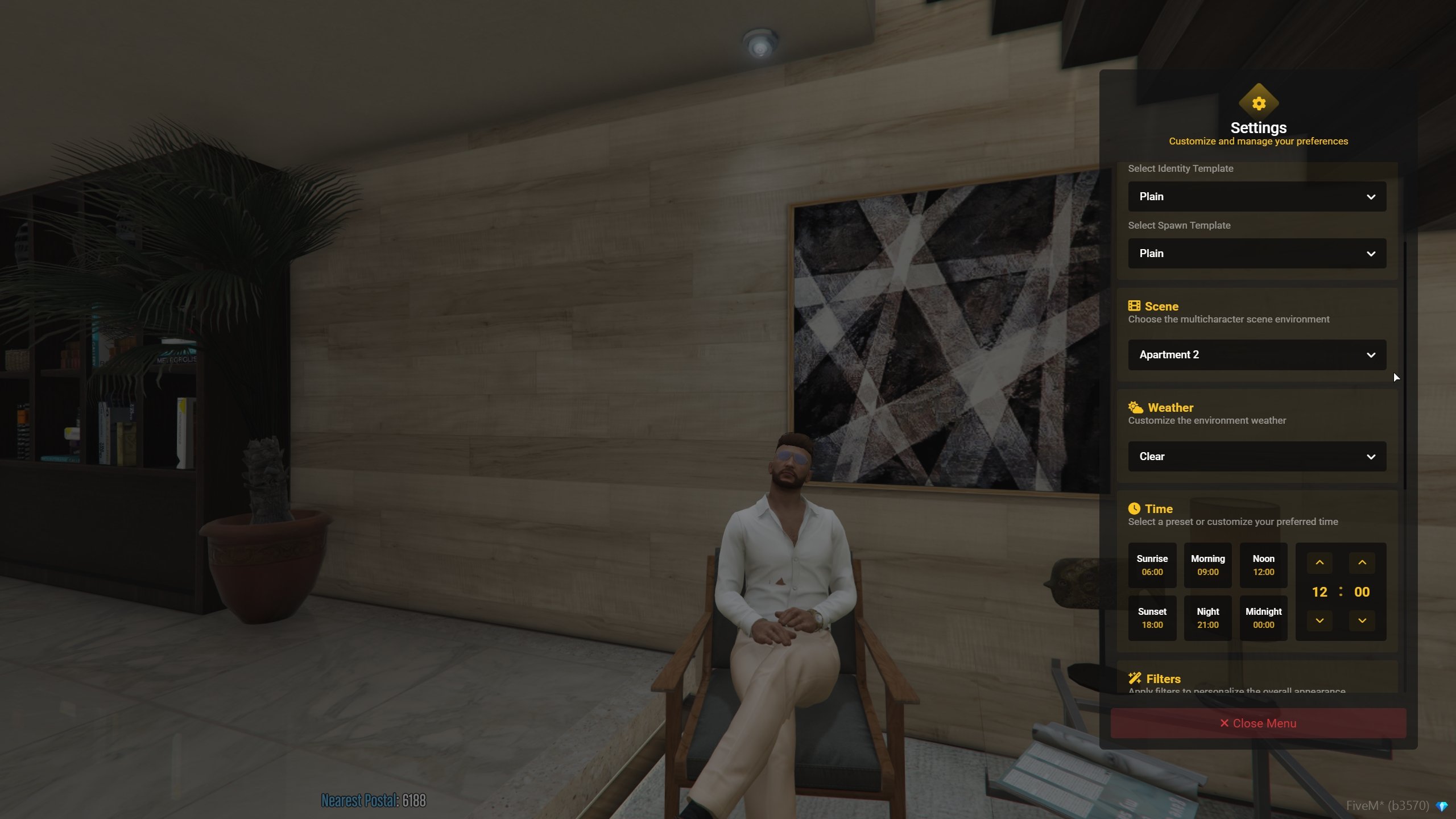
You can change how your character selection screen is presented. These settings affect the selection experience, not your character’s in-city identity or progression.
Character Screen Customization
Creating a New Character
When you have an available slot, select the option to create a character and follow the on-screen steps.
1
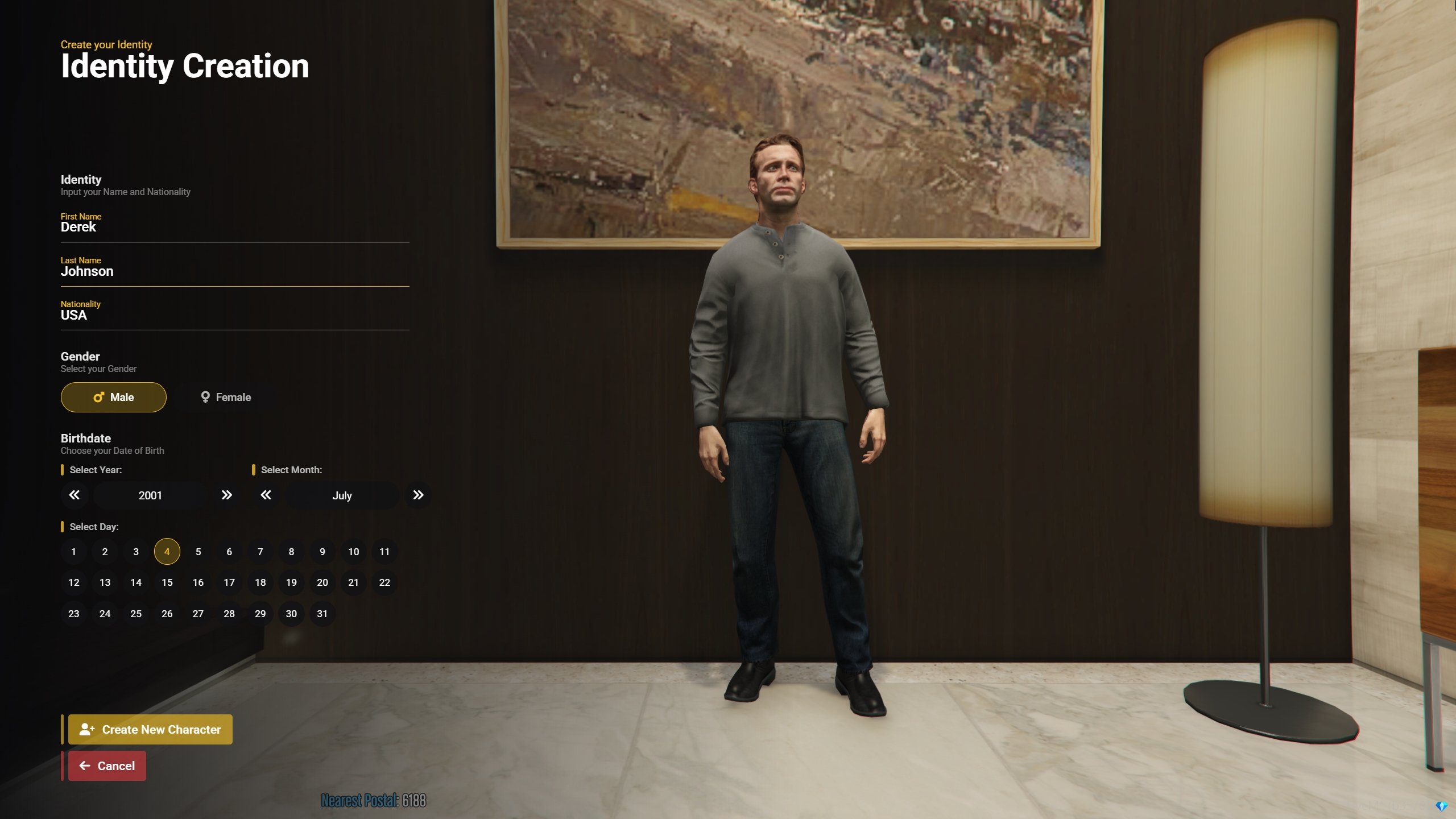
Enter Character Information
Fill out the requested character details. Choose an identity that fits the kind of person you intend to roleplay.
Character Information
2
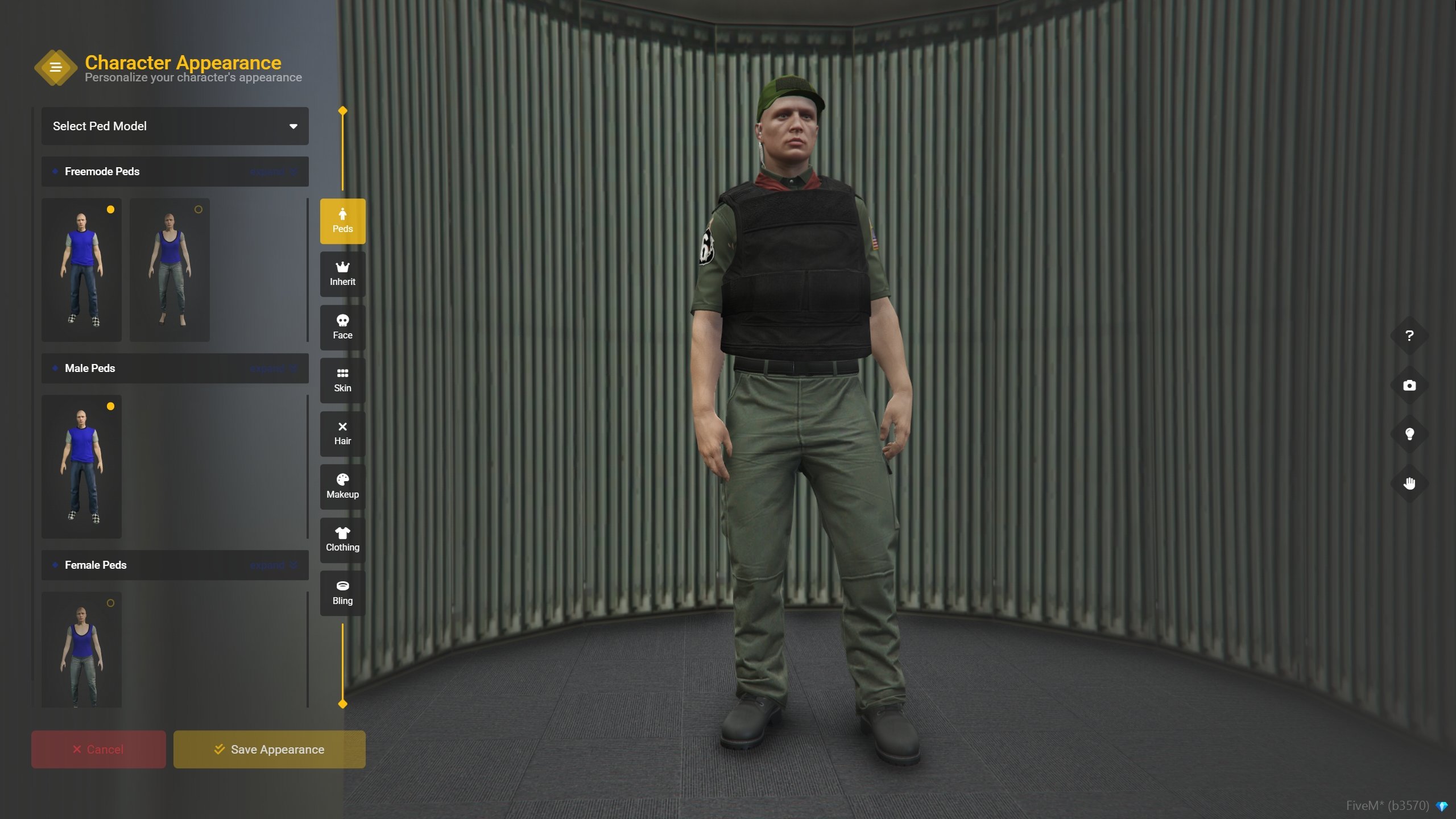
Customize Appearance
Use the appearance editor to adjust your character’s face, hairstyle, clothing, accessories, and other available features.
Character Customization
3
Review Your Choices
Check that the character’s information and appearance are what you intended before completing creation. Some details may not be as simple to change as clothing later.
4
Enter the City
Once the character is ready, continue to the available spawn options and begin playing.
You do not need to write a detailed biography before joining. A name, a general background, and a few personality traits are enough to get started.
Appearance Options
Equinox supports standard customization alongside additional faces, hairstyles, clothing, and accessories. The available options may vary depending on the character and the customization menu.
Face & Features
Adjust your character’s facial appearance and other available physical features.
Hair & Styling
Choose a hairstyle and related styling options to fit your character.
Clothing
Pick an outfit and accessories that make sense for your character’s lifestyle or work.
Changes Over Time
Your character’s style can develop as their circumstances change in the city.
Hair fades are available at tattoo parlors throughout the city.If a hairstyle, clothing option, or appearance feature appears to be missing or malfunctioning, you can report it through a support ticket. Equinox also uses additional custom face assets; the ONX Custom Face Pack is one of the referenced resources.
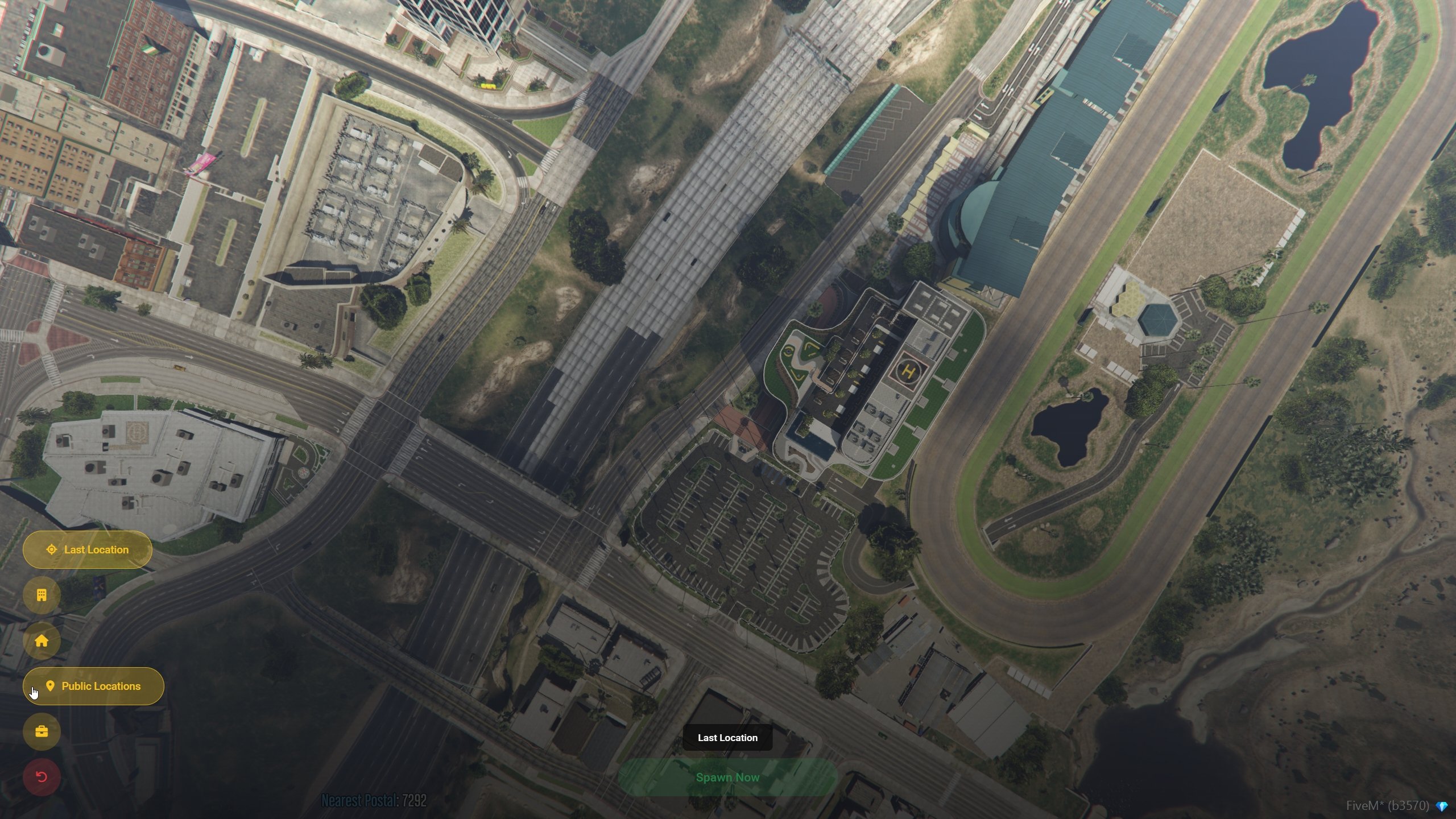
Choosing Where to Spawn
After selecting a character, you’ll normally see the Spawn Selection screen. Choose one of the available locations to determine where your character enters the city.
Spawn Selection
Spawn Restrictions
Spawn selection is restricted when your character is dead or downed or currently incarcerated. In these situations, your character is returned to the appropriate location rather than being allowed to select an unrelated spawn.Reconnecting does not bypass ongoing medical or incarceration roleplay.
Available spawn choices may depend on your character’s current circumstances. If the usual selection menu does not appear, consider whether an active restriction applies.
Creating a Believable Character
Character creation includes more than appearance. A simple idea of who your character is can help you make consistent decisions once you’re in the city.You can start by thinking about:
Background: Where did they come from, and why did they move to San Andreas?
Motivation: What do they want right now—work, stability, money, relationships, or something else?
Strengths: What are they genuinely good at?
Weaknesses: What mistakes or habits might cause them problems?
Boundaries: What risks would they take, and what would they refuse to do?
These do not need permanent answers. Your character can change through the people they meet and the events they experience.
Leave Room for Development
A new character does not need an established reputation, specialist knowledge, extensive connections, or a guaranteed career path. Letting them learn gradually usually creates more believable interactions.For example, a character may arrive looking for ordinary work, meet someone in the automotive industry, and eventually build a business. Another may start with a lawful job and make different choices after a series of setbacks. Neither story needs to be planned in full beforehand.
A useful starting point: Give your character a reason to be in the city and one or two goals. Let the rest develop through roleplay.
Playing Multiple Characters
Each character is a separate person, even when both belong to the same player. Their knowledge and relationships should come from what that character has experienced in-game.
Keep Character Knowledge Separate
Do not use an alternate character to transfer knowledge, confidential information, relationships, or other advantages between unrelated character stories.If one character learns a secret or meets a contact, another character does not automatically know that information.
Situation
Appropriate approach
Character A learns information during a conversation
Character B does not know it unless they learn it through their own roleplay
Character A joins a department or organization
Character B does not automatically gain access, authority, or inside knowledge
Character A becomes friends with someone
Character B has to establish their own relationship
You recognize someone from another character
Interact based on what your current character actually knows
This helps each character remain distinct instead of becoming interchangeable ways to access the same information.
Common Questions
How many characters can I create?
You begin with three character slots. Additional slots are optional and may be available through the Equinox store.
Can I change how the character selection screen looks?
Yes. The selection screen has presentation customization options separate from in-city character appearance.
Can I choose where I wake up every time?
Normally, you can choose from the available spawn locations. Characters who are downed, dead, or incarcerated are subject to spawn restrictions.
Are there custom faces and hairstyles?
Yes. Equinox offers additional appearance options beyond the standard GTA creator, including custom faces and hairstyles.
Where can I get hair fades?
Hair fades are available at tattoo parlors throughout the city.
Can my different characters share knowledge?
No. Each character should learn information and establish relationships through their own in-character experiences.
Once you’ve created your character, selected their appearance, and entered the city, you can begin developing their story through gameplay. You only need a starting point; the rest can come from the experiences they have in Equinox.
{"docsConfig":{"theme":"aspen","$schema":"https://mintlify.com/docs.json","name":"Equinox Roleplay User Guide","description":"The official Equinox Roleplay User Guide for getting started, server rules, public services, jobs, activities, and criminal roleplay.","colors":{"primary":"#DFAE1B","light":"#F9E155","dark":"#C79A13"},"logo":{"light":"https://mintcdn.com/equinox-roleplay/D2prCnRG4lBJO_Gt/images/RPLOGOCG2.png?fit=max\u0026auto=format\u0026n=D2prCnRG4lBJO_Gt\u0026q=85\u0026s=b4945375da98cc3f4dafcac827268804","dark":"https://mintcdn.com/equinox-roleplay/D2prCnRG4lBJO_Gt/images/RPLOGOCG2.png?fit=max\u0026auto=format\u0026n=D2prCnRG4lBJO_Gt\u0026q=85\u0026s=b4945375da98cc3f4dafcac827268804"},"favicon":{"light":"https://mintcdn.com/equinox-roleplay/D2prCnRG4lBJO_Gt/images/RPLOGOCG2.png?fit=max\u0026auto=format\u0026n=D2prCnRG4lBJO_Gt\u0026q=85\u0026s=b4945375da98cc3f4dafcac827268804","dark":"https://mintcdn.com/equinox-roleplay/D2prCnRG4lBJO_Gt/images/RPLOGOCG2.png?fit=max\u0026auto=format\u0026n=D2prCnRG4lBJO_Gt\u0026q=85\u0026s=b4945375da98cc3f4dafcac827268804"},"appearance":{"default":"dark"},"background":{"decoration":"gradient","color":{"light":"#FFFDF7","dark":"#000000"}},"navbar":{"links":[{"href":"https://discord.gg/equinoxroleplay","label":"Support"}],"primary":{"type":"button","label":"Join Discord","href":"https://discord.gg/equinoxroleplay"}},"footer":{"socials":{"youtube":"https://www.youtube.com/@EquinoxRoleplay","discord":"https://discord.gg/equinoxroleplay"}},"fonts":{"heading":{"family":"Lato"},"body":{"family":"Lato"}},"icons":{"library":"fontawesome"},"styling":{"codeblocks":"dark","latex":true},"banner":{"content":"Official Relaunch Set! November 28, 2026! JOIN US!","type":"info"},"contextual":{"options":["copy"],"display":"toc"},"thumbnails":{"appearance":"dark","background":"https://mintcdn.com/equinox-roleplay/WoXKKjdXBcDbKDdI/images/ERPserverbanner.png?fit=max\u0026auto=format\u0026n=WoXKKjdXBcDbKDdI\u0026q=85\u0026s=d893cceee90778b71911ca2662e8799f"},"metadata":{"timestamp":false},"navigation":{"pages":[]}},"deployment":{"deploymentMetadataValue":{"subdomain":"equinox-roleplay","hasAudioNarration":false,"actualSubdomain":"equinox-roleplay","customDomains":["docs.equinoxroleplay.com"],"gitSource":{"type":"github","owner":"freez3killztv","repo":"equinox-userguide","deployBranch":"main","contentDirectory":"","isPrivate":true,"mountPath":"","label":""},"entitlements":{"AI_CHAT":{"status":"DISABLED"}},"buildId":"6affe67b150f9f8171800e75","clientVersion":"0.0.4227","searchFilterCounts":[{"language":"default","tag":"Public Services","count":26},{"language":"default","tag":"Start Here","count":21},{"language":"default","tag":"Criminal Guide","count":12},{"language":"default","tag":"Welcome to Equinox","count":12},{"language":"default","tag":"Getting Started","count":9},{"language":"default","tag":"Department of Justice","count":9},{"language":"default","tag":"Robberies \u0026 Heists","count":7},{"language":"default","tag":"Bureau of Business Affairs","count":7},{"language":"default","tag":"Department of Public Safety","count":7},{"language":"default","tag":"Frequently Asked Questions","count":7}]},"assistantConfig":{"enableAskAiButton":false,"enableStarterQuestions":false,"enableContextualStarterQuestions":false,"enableAskAiSearchBar":true},"basePath":"","hasChatPermissions":false,"hasWebMcpPermissions":false,"toggles":[{"name":"kill-isr","enabled":true,"variant":{"name":"disabled","enabled":false,"feature_enabled":true},"impressionData":false},{"name":"custom-rbac-roles","enabled":true,"variant":{"name":"disabled","enabled":false,"feature_enabled":true},"impressionData":false},{"name":"agent-mintlify-slack","enabled":true,"variant":{"name":"disabled","enabled":false,"feature_enabled":true},"impressionData":false},{"name":"agent-integrations-settings","enabled":true,"variant":{"name":"disabled","enabled":false,"feature_enabled":true},"impressionData":false},{"name":"rbac-expansion","enabled":true,"variant":{"name":"disabled","enabled":false,"feature_enabled":true},"impressionData":false},{"name":"automations-pr-grouping","enabled":true,"variant":{"name":"disabled","enabled":false,"feature_enabled":true},"impressionData":false},{"name":"custom-prefix","enabled":true,"variant":{"name":"disabled","enabled":false,"feature_enabled":true},"impressionData":false},{"name":"analytics-v7","enabled":true,"variant":{"name":"disabled","enabled":false,"feature_enabled":true},"impressionData":false},{"name":"user-flows-analytics","enabled":true,"variant":{"name":"disabled","enabled":false,"feature_enabled":true},"impressionData":false},{"name":"no-publish-flow","enabled":true,"variant":{"name":"disabled","enabled":false,"feature_enabled":true},"impressionData":false},{"name":"workos-onboarding","enabled":true,"variant":{"name":"disabled","enabled":false,"feature_enabled":true},"impressionData":false},{"name":"snapshot-serving-live","enabled":true,"variant":{"name":"disabled","enabled":false,"feature_enabled":true},"impressionData":false},{"name":"stripTemperatureMiddleware","enabled":true,"variant":{"name":"disabled","enabled":false,"feature_enabled":true},"impressionData":false},{"name":"support-platform-pylon-zendesk","enabled":true,"variant":{"name":"disabled","enabled":false,"feature_enabled":true},"impressionData":false},{"name":"snapshot-serving","enabled":true,"variant":{"name":"disabled","enabled":false,"feature_enabled":true},"impressionData":false},{"name":"instant-rollback","enabled":true,"variant":{"name":"disabled","enabled":false,"feature_enabled":true},"impressionData":false},{"name":"granular-notifications-server","enabled":true,"variant":{"name":"disabled","enabled":false,"feature_enabled":true},"impressionData":false},{"name":"granular-notifications","enabled":true,"variant":{"name":"disabled","enabled":false,"feature_enabled":true},"impressionData":false},{"name":"automations-fable","enabled":true,"variant":{"name":"disabled","enabled":false,"feature_enabled":true},"impressionData":false},{"name":"fixed-ai-action-pricing","enabled":true,"variant":{"name":"disabled","enabled":false,"feature_enabled":true},"impressionData":false},{"name":"site-roles","enabled":true,"variant":{"name":"disabled","enabled":false,"feature_enabled":true},"impressionData":false},{"name":"automation-resolve-merge-conflict","enabled":true,"variant":{"name":"disabled","enabled":false,"feature_enabled":true},"impressionData":false},{"name":"scoped-publishing","enabled":true,"variant":{"name":"disabled","enabled":false,"feature_enabled":true},"impressionData":false},{"name":"mintql","enabled":true,"variant":{"name":"disabled","enabled":false,"feature_enabled":true},"impressionData":false},{"name":"page-level-analytics","enabled":true,"variant":{"name":"disabled","enabled":false,"feature_enabled":true},"impressionData":false},{"name":"editor-version-history-v2","enabled":true,"variant":{"name":"disabled","enabled":false,"feature_enabled":true},"impressionData":false},{"name":"billing-page-v2","enabled":true,"variant":{"name":"disabled","enabled":false,"feature_enabled":true},"impressionData":false},{"name":"full-page-search","enabled":true,"variant":{"name":"disabled","enabled":false,"feature_enabled":true},"impressionData":false},{"name":"workspace-projects","enabled":true,"variant":{"name":"disabled","enabled":false,"feature_enabled":true},"impressionData":false},{"name":"assistant-v5","enabled":true,"variant":{"name":"disabled","enabled":false,"feature_enabled":true},"impressionData":false},{"name":"fork-pr-previews","enabled":true,"variant":{"name":"disabled","enabled":false,"feature_enabled":true},"impressionData":false},{"name":"revalidation-jwt","enabled":true,"variant":{"name":"disabled","enabled":false,"feature_enabled":true},"impressionData":false},{"name":"workos-sso-scim","enabled":true,"variant":{"name":"disabled","enabled":false,"feature_enabled":true},"impressionData":false},{"name":"hobby-abuse-scan","enabled":true,"variant":{"name":"disabled","enabled":false,"feature_enabled":true},"impressionData":false},{"name":"dashboard-inbox","enabled":true,"variant":{"name":"disabled","enabled":false,"feature_enabled":true},"impressionData":false},{"name":"workos-signup","enabled":true,"variant":{"name":"disabled","enabled":false,"feature_enabled":true},"impressionData":false},{"name":"turbopuffer-dual-write","enabled":true,"variant":{"name":"disabled","enabled":false,"feature_enabled":true},"impressionData":false},{"name":"workos-enabled","enabled":true,"variant":{"name":"disabled","enabled":false,"feature_enabled":true},"impressionData":false},{"name":"approve-review-flow","enabled":true,"variant":{"name":"disabled","enabled":false,"feature_enabled":true},"impressionData":false},{"name":"editor-metadata","enabled":true,"variant":{"name":"disabled","enabled":false,"feature_enabled":true},"impressionData":false},{"name":"sso-setup-deadline-banner","enabled":true,"variant":{"name":"disabled","enabled":false,"feature_enabled":true},"impressionData":false},{"name":"turbopuffer-serve","enabled":true,"variant":{"name":"disabled","enabled":false,"feature_enabled":true},"impressionData":false},{"name":"live-agents","enabled":true,"variant":{"name":"disabled","enabled":false,"feature_enabled":true},"impressionData":false},{"name":"starter-pricing","enabled":true,"variant":{"name":"treatment","enabled":true,"payload":{"type":"string","value":"treatment"},"feature_enabled":true},"impressionData":false},{"name":"llms-txt-v2","enabled":true,"variant":{"name":"disabled","enabled":false,"feature_enabled":true},"impressionData":false},{"name":"wildcard-email-auth","enabled":true,"variant":{"name":"disabled","enabled":false,"feature_enabled":true},"impressionData":false}],"googleFontsInlined":true},"customCss":[]}
{"page":{"pagePath":"character-creation","slug":"/character-creation","pageMetadata":{"title":"Character Creation","icon":"user","description":"Learn how to create and select characters in Equinox Roleplay, customize your appearance and selection screen, choose a spawn, and keep character stories separate.","href":"/character-creation"},"description":{"compiledSource":"\"use strict\";\nconst {jsx: _jsx} = arguments[0];\nconst {useMDXComponents: _provideComponents} = arguments[0];\nfunction _createMdxContent(props) {\n const _components = {\n p: \"p\",\n ..._provideComponents(),\n ...props.components\n };\n return _jsx(_components.p, {\n children: \"Learn how to create and select characters in Equinox Roleplay, customize your appearance and selection screen, choose a spawn, and keep character stories separate.\"\n });\n}\nfunction MDXContent(props = {}) {\n const {wrapper: MDXLayout} = {\n ..._provideComponents(),\n ...props.components\n };\n return MDXLayout ? _jsx(MDXLayout, {\n ...props,\n children: _jsx(_createMdxContent, {\n ...props\n })\n }) : _createMdxContent(props);\n}\nreturn {\n default: MDXContent\n};\n","frontmatter":{},"scope":{}},"pageType":"default","mdx":{"mdxSource":{"compiledSource":"\"use strict\";const{Fragment:_Fragment,jsx:_jsx,jsxs:_jsxs}=arguments[0];const{useMDXComponents:_provideComponents}=arguments[0];function _createMdxContent(props){const _components={a:`a`,hr:`hr`,li:`li`,p:`p`,strong:`strong`,tbody:`tbody`,td:`td`,th:`th`,thead:`thead`,tr:`tr`,ul:`ul`,..._provideComponents(),...props.components},{Accordion,AccordionGroup,Card,CardGroup,Frame,Heading,Info,Note,OptimizedImage,Step,Steps,Table,Tip,Warning}=_components;if(!Accordion)_missingMdxReference(`Accordion`,true);if(!AccordionGroup)_missingMdxReference(`AccordionGroup`,true);if(!Card)_missingMdxReference(`Card`,true);if(!CardGroup)_missingMdxReference(`CardGroup`,true);if(!Frame)_missingMdxReference(`Frame`,true);if(!Heading)_missingMdxReference(`Heading`,true);if(!Info)_missingMdxReference(`Info`,true);if(!Note)_missingMdxReference(`Note`,true);if(!OptimizedImage)_missingMdxReference(`OptimizedImage`,true);if(!Step)_missingMdxReference(`Step`,true);if(!Steps)_missingMdxReference(`Steps`,true);if(!Table)_missingMdxReference(`Table`,true);if(!Tip)_missingMdxReference(`Tip`,true);if(!Warning)_missingMdxReference(`Warning`,true);return _jsxs(_Fragment,{children:[_jsxs(_components.p,{children:[`The `,_jsx(_components.strong,{children:`Character Creation`}),` system is where you create a new identity or choose an existing character before entering Equinox Roleplay.`]}),`\n`,_jsx(_components.p,{children:`It includes character slots, appearance customization, a personalized selection screen, and spawn selection. Each character has their own identity and story, so it’s worth understanding the options before getting started.`}),`\n`,_jsx(Info,{children:_jsxs(_components.p,{children:[_jsx(_components.strong,{children:`First time connecting?`}),` You’ll be guided through creating your first character. If you’ve played before, you’ll normally arrive at the `,_jsx(_components.strong,{children:`Character Selection`}),` screen.`]})}),`\n`,_jsx(_components.hr,{}),`\n`,_jsx(Heading,{level:`1`,id:`character-selection`,children:`Character Selection`}),`\n`,_jsx(_components.p,{children:`The Character Selection screen displays the characters available on your account. Choose the character you want to play to continue their story.`}),`\n`,_jsx(Frame,{caption:`Character Selection`,children:_jsx(OptimizedImage,{src:`https://mintcdn.com/equinox-roleplay/RFcDffHNMLpN6PKt/images/FiveM_b3570_GTAProcess_4SkFvvtKYh.jpg?fit=max\u0026auto=format\u0026n=RFcDffHNMLpN6PKt\u0026q=85\u0026s=59575b92f2a58fc1152a02f369fa9e0b`,alt:`Equinox Roleplay character selection screen`,\"data-og-width\":`2560`,width:`2560`,\"data-og-height\":`1440`,height:`1440`,\"data-path\":`images/FiveM_b3570_GTAProcess_4SkFvvtKYh.jpg`,\"data-optimize\":`true`,\"data-opv\":`3`,srcset:`https://mintcdn.com/equinox-roleplay/RFcDffHNMLpN6PKt/images/FiveM_b3570_GTAProcess_4SkFvvtKYh.jpg?w=280\u0026fit=max\u0026auto=format\u0026n=RFcDffHNMLpN6PKt\u0026q=85\u0026s=dd78699d0caf22a9ebff2e862035f4e8 280w, https://mintcdn.com/equinox-roleplay/RFcDffHNMLpN6PKt/images/FiveM_b3570_GTAProcess_4SkFvvtKYh.jpg?w=560\u0026fit=max\u0026auto=format\u0026n=RFcDffHNMLpN6PKt\u0026q=85\u0026s=3fc082e664a68f1d05a468234b00a62f 560w, https://mintcdn.com/equinox-roleplay/RFcDffHNMLpN6PKt/images/FiveM_b3570_GTAProcess_4SkFvvtKYh.jpg?w=840\u0026fit=max\u0026auto=format\u0026n=RFcDffHNMLpN6PKt\u0026q=85\u0026s=3732859625d20a5c200d93ac4492d298 840w, https://mintcdn.com/equinox-roleplay/RFcDffHNMLpN6PKt/images/FiveM_b3570_GTAProcess_4SkFvvtKYh.jpg?w=1100\u0026fit=max\u0026auto=format\u0026n=RFcDffHNMLpN6PKt\u0026q=85\u0026s=fd348485a8bbc3a4dc2303830e802c95 1100w, https://mintcdn.com/equinox-roleplay/RFcDffHNMLpN6PKt/images/FiveM_b3570_GTAProcess_4SkFvvtKYh.jpg?w=1650\u0026fit=max\u0026auto=format\u0026n=RFcDffHNMLpN6PKt\u0026q=85\u0026s=5c7a0f0ff81fd576a29c2beb2b7dfd6d 1650w, https://mintcdn.com/equinox-roleplay/RFcDffHNMLpN6PKt/images/FiveM_b3570_GTAProcess_4SkFvvtKYh.jpg?w=2500\u0026fit=max\u0026auto=format\u0026n=RFcDffHNMLpN6PKt\u0026q=85\u0026s=9e5850d9671f679c54bf06a05e5d8ef3 2500w`})}),`\n`,_jsx(Heading,{level:`2`,id:`character-slots`,children:`Character Slots`}),`\n`,_jsxs(_components.p,{children:[`Every player starts with `,_jsx(_components.strong,{children:`3 character slots`}),`. A slot allows you to create and maintain a separate character.`]}),`\n`,_jsxs(Table,{children:[_jsx(_components.thead,{children:_jsxs(_components.tr,{children:[_jsx(_components.th,{children:`Feature`}),_jsx(_components.th,{children:`Details`})]})}),_jsxs(_components.tbody,{children:[_jsxs(_components.tr,{children:[_jsx(_components.td,{children:`Standard slots`}),_jsxs(_components.td,{children:[_jsx(_components.strong,{children:`3`}),` per player`]})]}),_jsxs(_components.tr,{children:[_jsx(_components.td,{children:`Additional slots`}),_jsx(_components.td,{children:`Optional, available through the Equinox store`})]}),_jsxs(_components.tr,{children:[_jsx(_components.td,{children:`Character selection`}),_jsx(_components.td,{children:`Choose which existing character to play when connecting`})]}),_jsxs(_components.tr,{children:[_jsx(_components.td,{children:`Character separation`}),_jsx(_components.td,{children:`Each character has their own identity, experiences, and knowledge`})]})]})]}),`\n`,_jsx(Note,{children:_jsx(_components.p,{children:`You do not need additional slots to begin playing. Three slots are included by default.`})}),`\n`,_jsxs(_components.p,{children:[`For players who need more, see the `,_jsx(_components.a,{href:`https://tebex.equinoxroleplay.com/category/character-slots`,children:`additional character slots page`}),`. Availability and terms are shown by the store.`]}),`\n`,_jsx(Heading,{level:`2`,id:`customizing-the-selection-screen`,children:`Customizing the Selection Screen`}),`\n`,_jsxs(_components.p,{children:[`You can change how your character selection screen is presented. These settings affect the `,_jsx(_components.strong,{children:`selection experience`}),`, not your character’s in-city identity or progression.`]}),`\n`,_jsx(Frame,{caption:`Character Screen Customization`,children:_jsx(OptimizedImage,{src:`https://mintcdn.com/equinox-roleplay/RFcDffHNMLpN6PKt/images/FiveM_b3570_GTAProcess_GTJYhTbEzw.jpg?fit=max\u0026auto=format\u0026n=RFcDffHNMLpN6PKt\u0026q=85\u0026s=55d1739faa6ea46959e00d41911b0f0d`,alt:`Character selection screen customization options`,\"data-og-width\":`2560`,width:`2560`,\"data-og-height\":`1440`,height:`1440`,\"data-path\":`images/FiveM_b3570_GTAProcess_GTJYhTbEzw.jpg`,\"data-optimize\":`true`,\"data-opv\":`3`,srcset:`https://mintcdn.com/equinox-roleplay/RFcDffHNMLpN6PKt/images/FiveM_b3570_GTAProcess_GTJYhTbEzw.jpg?w=280\u0026fit=max\u0026auto=format\u0026n=RFcDffHNMLpN6PKt\u0026q=85\u0026s=b62d08f1df3c800be955695c7bfd9a4e 280w, https://mintcdn.com/equinox-roleplay/RFcDffHNMLpN6PKt/images/FiveM_b3570_GTAProcess_GTJYhTbEzw.jpg?w=560\u0026fit=max\u0026auto=format\u0026n=RFcDffHNMLpN6PKt\u0026q=85\u0026s=952d429866c608048c47a094f698659f 560w, https://mintcdn.com/equinox-roleplay/RFcDffHNMLpN6PKt/images/FiveM_b3570_GTAProcess_GTJYhTbEzw.jpg?w=840\u0026fit=max\u0026auto=format\u0026n=RFcDffHNMLpN6PKt\u0026q=85\u0026s=c791eca5877f88400c007bc48464af31 840w, https://mintcdn.com/equinox-roleplay/RFcDffHNMLpN6PKt/images/FiveM_b3570_GTAProcess_GTJYhTbEzw.jpg?w=1100\u0026fit=max\u0026auto=format\u0026n=RFcDffHNMLpN6PKt\u0026q=85\u0026s=1842d684e5a2f6108ed914f1e4ce8e1d 1100w, https://mintcdn.com/equinox-roleplay/RFcDffHNMLpN6PKt/images/FiveM_b3570_GTAProcess_GTJYhTbEzw.jpg?w=1650\u0026fit=max\u0026auto=format\u0026n=RFcDffHNMLpN6PKt\u0026q=85\u0026s=928a1e4a486581fa6904c3b6fb45b0a8 1650w, https://mintcdn.com/equinox-roleplay/RFcDffHNMLpN6PKt/images/FiveM_b3570_GTAProcess_GTJYhTbEzw.jpg?w=2500\u0026fit=max\u0026auto=format\u0026n=RFcDffHNMLpN6PKt\u0026q=85\u0026s=39defdc41ba8699cfe190e5a101514b1 2500w`})}),`\n`,_jsx(_components.hr,{}),`\n`,_jsx(Heading,{level:`1`,id:`creating-a-new-character`,children:`Creating a New Character`}),`\n`,_jsx(_components.p,{children:`When you have an available slot, select the option to create a character and follow the on-screen steps.`}),`\n`,_jsxs(Steps,{children:[_jsxs(Step,{title:`Enter Character Information`,children:[_jsx(_components.p,{children:`Fill out the requested character details. Choose an identity that fits the kind of person you intend to roleplay.`}),_jsx(Frame,{caption:`Character Information`,children:_jsx(OptimizedImage,{src:`https://mintcdn.com/equinox-roleplay/RFcDffHNMLpN6PKt/images/FiveM_b3570_GTAProcess_enCq2wPJgO.jpg?fit=max\u0026auto=format\u0026n=RFcDffHNMLpN6PKt\u0026q=85\u0026s=49ac4c7f30bd46ecca6819742e08e6a0`,alt:`New character information form`,\"data-og-width\":`2560`,width:`2560`,\"data-og-height\":`1440`,height:`1440`,\"data-path\":`images/FiveM_b3570_GTAProcess_enCq2wPJgO.jpg`,\"data-optimize\":`true`,\"data-opv\":`3`,srcset:`https://mintcdn.com/equinox-roleplay/RFcDffHNMLpN6PKt/images/FiveM_b3570_GTAProcess_enCq2wPJgO.jpg?w=280\u0026fit=max\u0026auto=format\u0026n=RFcDffHNMLpN6PKt\u0026q=85\u0026s=c92bddbb1c77d06da0edd89b56177d60 280w, https://mintcdn.com/equinox-roleplay/RFcDffHNMLpN6PKt/images/FiveM_b3570_GTAProcess_enCq2wPJgO.jpg?w=560\u0026fit=max\u0026auto=format\u0026n=RFcDffHNMLpN6PKt\u0026q=85\u0026s=e7ab1acdb04a0fdbc7c7b2fee95f8c28 560w, https://mintcdn.com/equinox-roleplay/RFcDffHNMLpN6PKt/images/FiveM_b3570_GTAProcess_enCq2wPJgO.jpg?w=840\u0026fit=max\u0026auto=format\u0026n=RFcDffHNMLpN6PKt\u0026q=85\u0026s=d52521044f662f5e8b8003f40fcf55f2 840w, https://mintcdn.com/equinox-roleplay/RFcDffHNMLpN6PKt/images/FiveM_b3570_GTAProcess_enCq2wPJgO.jpg?w=1100\u0026fit=max\u0026auto=format\u0026n=RFcDffHNMLpN6PKt\u0026q=85\u0026s=d76c5444a35c020452812e572eb26a03 1100w, https://mintcdn.com/equinox-roleplay/RFcDffHNMLpN6PKt/images/FiveM_b3570_GTAProcess_enCq2wPJgO.jpg?w=1650\u0026fit=max\u0026auto=format\u0026n=RFcDffHNMLpN6PKt\u0026q=85\u0026s=a7a839c6791202b16de53f3e83a001f5 1650w, https://mintcdn.com/equinox-roleplay/RFcDffHNMLpN6PKt/images/FiveM_b3570_GTAProcess_enCq2wPJgO.jpg?w=2500\u0026fit=max\u0026auto=format\u0026n=RFcDffHNMLpN6PKt\u0026q=85\u0026s=a7bd824bbad6615b8df49688e4f5be21 2500w`})})]}),_jsxs(Step,{title:`Customize Appearance`,children:[_jsx(_components.p,{children:`Use the appearance editor to adjust your character’s face, hairstyle, clothing, accessories, and other available features.`}),_jsx(Frame,{caption:`Character Customization`,children:_jsx(OptimizedImage,{src:`https://mintcdn.com/equinox-roleplay/RFcDffHNMLpN6PKt/images/FiveM_b3570_GTAProcess_D8SbDWJkiy.jpg?fit=max\u0026auto=format\u0026n=RFcDffHNMLpN6PKt\u0026q=85\u0026s=a94903986bf5ea84389d559ebfbf32c7`,alt:`Character customization and appearance editor`,\"data-og-width\":`2560`,width:`2560`,\"data-og-height\":`1440`,height:`1440`,\"data-path\":`images/FiveM_b3570_GTAProcess_D8SbDWJkiy.jpg`,\"data-optimize\":`true`,\"data-opv\":`3`,srcset:`https://mintcdn.com/equinox-roleplay/RFcDffHNMLpN6PKt/images/FiveM_b3570_GTAProcess_D8SbDWJkiy.jpg?w=280\u0026fit=max\u0026auto=format\u0026n=RFcDffHNMLpN6PKt\u0026q=85\u0026s=038cd7d185854e6b2296a91b5fca5ccb 280w, https://mintcdn.com/equinox-roleplay/RFcDffHNMLpN6PKt/images/FiveM_b3570_GTAProcess_D8SbDWJkiy.jpg?w=560\u0026fit=max\u0026auto=format\u0026n=RFcDffHNMLpN6PKt\u0026q=85\u0026s=b9d0b7e504547e4167defcf2b1feb43b 560w, https://mintcdn.com/equinox-roleplay/RFcDffHNMLpN6PKt/images/FiveM_b3570_GTAProcess_D8SbDWJkiy.jpg?w=840\u0026fit=max\u0026auto=format\u0026n=RFcDffHNMLpN6PKt\u0026q=85\u0026s=1f7c5cd346babf4dbf586077bb1bdbdc 840w, https://mintcdn.com/equinox-roleplay/RFcDffHNMLpN6PKt/images/FiveM_b3570_GTAProcess_D8SbDWJkiy.jpg?w=1100\u0026fit=max\u0026auto=format\u0026n=RFcDffHNMLpN6PKt\u0026q=85\u0026s=d6c69aa7c473a18c8b30accea3bdb744 1100w, https://mintcdn.com/equinox-roleplay/RFcDffHNMLpN6PKt/images/FiveM_b3570_GTAProcess_D8SbDWJkiy.jpg?w=1650\u0026fit=max\u0026auto=format\u0026n=RFcDffHNMLpN6PKt\u0026q=85\u0026s=84aa64a37ebf48cbb1837fa74d54c76f 1650w, https://mintcdn.com/equinox-roleplay/RFcDffHNMLpN6PKt/images/FiveM_b3570_GTAProcess_D8SbDWJkiy.jpg?w=2500\u0026fit=max\u0026auto=format\u0026n=RFcDffHNMLpN6PKt\u0026q=85\u0026s=892f440b69f2b5b74446766483486516 2500w`})})]}),_jsx(Step,{title:`Review Your Choices`,children:_jsx(_components.p,{children:`Check that the character’s information and appearance are what you intended before completing creation. Some details may not be as simple to change as clothing later.`})}),_jsx(Step,{title:`Enter the City`,children:_jsx(_components.p,{children:`Once the character is ready, continue to the available spawn options and begin playing.`})})]}),`\n`,_jsx(Tip,{children:_jsx(_components.p,{children:`You do not need to write a detailed biography before joining. A name, a general background, and a few personality traits are enough to get started.`})}),`\n`,_jsx(_components.hr,{}),`\n`,_jsx(Heading,{level:`1`,id:`appearance-options`,children:`Appearance Options`}),`\n`,_jsx(_components.p,{children:`Equinox supports standard customization alongside additional faces, hairstyles, clothing, and accessories. The available options may vary depending on the character and the customization menu.`}),`\n`,_jsxs(CardGroup,{cols:2,children:[_jsx(Card,{title:`Face \u0026 Features`,icon:`user-beard`,children:_jsx(_components.p,{children:`Adjust your character’s facial appearance and other available physical features.`})}),_jsx(Card,{title:`Hair \u0026 Styling`,icon:`scissors`,children:_jsx(_components.p,{children:`Choose a hairstyle and related styling options to fit your character.`})}),_jsx(Card,{title:`Clothing`,icon:`shirt`,children:_jsx(_components.p,{children:`Pick an outfit and accessories that make sense for your character’s lifestyle or work.`})}),_jsx(Card,{title:`Changes Over Time`,icon:`refresh`,children:_jsx(_components.p,{children:`Your character’s style can develop as their circumstances change in the city.`})})]}),`\n`,_jsxs(_components.p,{children:[_jsx(_components.strong,{children:`Hair fades are available at tattoo parlors`}),` throughout the city.`]}),`\n`,_jsxs(_components.p,{children:[`If a hairstyle, clothing option, or appearance feature appears to be missing or malfunctioning, you can report it through a support ticket. Equinox also uses additional custom face assets; the `,_jsx(_components.a,{href:`https://store.onx.gg/package/6187602`,children:`ONX Custom Face Pack`}),` is one of the referenced resources.`]}),`\n`,_jsx(_components.hr,{}),`\n`,_jsx(Heading,{level:`1`,id:`choosing-where-to-spawn`,children:`Choosing Where to Spawn`}),`\n`,_jsxs(_components.p,{children:[`After selecting a character, you’ll normally see the `,_jsx(_components.strong,{children:`Spawn Selection`}),` screen. Choose one of the available locations to determine where your character enters the city.`]}),`\n`,_jsx(Frame,{caption:`Spawn Selection`,children:_jsx(OptimizedImage,{src:`https://mintcdn.com/equinox-roleplay/RFcDffHNMLpN6PKt/images/FiveM_b3570_GTAProcess_wigkQnZv80.jpg?fit=max\u0026auto=format\u0026n=RFcDffHNMLpN6PKt\u0026q=85\u0026s=96da117cf6c7db506fa74afc9e00efeb`,alt:`Equinox Roleplay spawn selection screen`,\"data-og-width\":`2560`,width:`2560`,\"data-og-height\":`1440`,height:`1440`,\"data-path\":`images/FiveM_b3570_GTAProcess_wigkQnZv80.jpg`,\"data-optimize\":`true`,\"data-opv\":`3`,srcset:`https://mintcdn.com/equinox-roleplay/RFcDffHNMLpN6PKt/images/FiveM_b3570_GTAProcess_wigkQnZv80.jpg?w=280\u0026fit=max\u0026auto=format\u0026n=RFcDffHNMLpN6PKt\u0026q=85\u0026s=600d11906928e032f292e90661ae43e7 280w, https://mintcdn.com/equinox-roleplay/RFcDffHNMLpN6PKt/images/FiveM_b3570_GTAProcess_wigkQnZv80.jpg?w=560\u0026fit=max\u0026auto=format\u0026n=RFcDffHNMLpN6PKt\u0026q=85\u0026s=48ecf795d6c64d466a75b9aad8c11587 560w, https://mintcdn.com/equinox-roleplay/RFcDffHNMLpN6PKt/images/FiveM_b3570_GTAProcess_wigkQnZv80.jpg?w=840\u0026fit=max\u0026auto=format\u0026n=RFcDffHNMLpN6PKt\u0026q=85\u0026s=27a48837ebe746720922e2901b3dbe47 840w, https://mintcdn.com/equinox-roleplay/RFcDffHNMLpN6PKt/images/FiveM_b3570_GTAProcess_wigkQnZv80.jpg?w=1100\u0026fit=max\u0026auto=format\u0026n=RFcDffHNMLpN6PKt\u0026q=85\u0026s=43b9e5155edf346cb84ba3340ff00cbd 1100w, https://mintcdn.com/equinox-roleplay/RFcDffHNMLpN6PKt/images/FiveM_b3570_GTAProcess_wigkQnZv80.jpg?w=1650\u0026fit=max\u0026auto=format\u0026n=RFcDffHNMLpN6PKt\u0026q=85\u0026s=d28d152be0a7ac6159004d8f6aa4184a 1650w, https://mintcdn.com/equinox-roleplay/RFcDffHNMLpN6PKt/images/FiveM_b3570_GTAProcess_wigkQnZv80.jpg?w=2500\u0026fit=max\u0026auto=format\u0026n=RFcDffHNMLpN6PKt\u0026q=85\u0026s=c128de25025458f635fe407847625bfd 2500w`})}),`\n`,_jsxs(Warning,{children:[_jsx(Heading,{level:`3`,id:`spawn-restrictions`,children:`Spawn Restrictions`}),_jsxs(_components.p,{children:[`Spawn selection is restricted when your character is `,_jsx(_components.strong,{children:`dead or downed`}),` or `,_jsx(_components.strong,{children:`currently incarcerated`}),`. In these situations, your character is returned to the appropriate location rather than being allowed to select an unrelated spawn.`]}),_jsx(_components.p,{children:`Reconnecting does not bypass ongoing medical or incarceration roleplay.`})]}),`\n`,_jsx(Note,{children:_jsx(_components.p,{children:`Available spawn choices may depend on your character’s current circumstances. If the usual selection menu does not appear, consider whether an active restriction applies.`})}),`\n`,_jsx(_components.hr,{}),`\n`,_jsx(Heading,{level:`1`,id:`creating-a-believable-character`,children:`Creating a Believable Character`}),`\n`,_jsx(_components.p,{children:`Character creation includes more than appearance. A simple idea of who your character is can help you make consistent decisions once you’re in the city.`}),`\n`,_jsx(_components.p,{children:`You can start by thinking about:`}),`\n`,_jsxs(_components.ul,{children:[`\n`,_jsxs(_components.li,{children:[_jsx(_components.strong,{children:`Background:`}),` Where did they come from, and why did they move to San Andreas?`]}),`\n`,_jsxs(_components.li,{children:[_jsx(_components.strong,{children:`Motivation:`}),` What do they want right now—work, stability, money, relationships, or something else?`]}),`\n`,_jsxs(_components.li,{children:[_jsx(_components.strong,{children:`Strengths:`}),` What are they genuinely good at?`]}),`\n`,_jsxs(_components.li,{children:[_jsx(_components.strong,{children:`Weaknesses:`}),` What mistakes or habits might cause them problems?`]}),`\n`,_jsxs(_components.li,{children:[_jsx(_components.strong,{children:`Boundaries:`}),` What risks would they take, and what would they refuse to do?`]}),`\n`]}),`\n`,_jsx(_components.p,{children:`These do not need permanent answers. Your character can change through the people they meet and the events they experience.`}),`\n`,_jsx(Heading,{level:`2`,id:`leave-room-for-development`,children:`Leave Room for Development`}),`\n`,_jsx(_components.p,{children:`A new character does not need an established reputation, specialist knowledge, extensive connections, or a guaranteed career path. Letting them learn gradually usually creates more believable interactions.`}),`\n`,_jsx(_components.p,{children:`For example, a character may arrive looking for ordinary work, meet someone in the automotive industry, and eventually build a business. Another may start with a lawful job and make different choices after a series of setbacks. Neither story needs to be planned in full beforehand.`}),`\n`,_jsx(Info,{children:_jsxs(_components.p,{children:[_jsx(_components.strong,{children:`A useful starting point:`}),` Give your character a reason to be in the city and one or two goals. Let the rest develop through roleplay.`]})}),`\n`,_jsx(_components.hr,{}),`\n`,_jsx(Heading,{level:`1`,id:`playing-multiple-characters`,children:`Playing Multiple Characters`}),`\n`,_jsxs(_components.p,{children:[`Each character is a `,_jsx(_components.strong,{children:`separate person`}),`, even when both belong to the same player. Their knowledge and relationships should come from what `,_jsx(_components.strong,{children:`that character`}),` has experienced in-game.`]}),`\n`,_jsxs(Warning,{children:[_jsx(Heading,{level:`3`,id:`keep-character-knowledge-separate`,children:`Keep Character Knowledge Separate`}),_jsx(_components.p,{children:`Do not use an alternate character to transfer knowledge, confidential information, relationships, or other advantages between unrelated character stories.`}),_jsx(_components.p,{children:`If one character learns a secret or meets a contact, another character does not automatically know that information.`})]}),`\n`,_jsxs(Table,{children:[_jsx(_components.thead,{children:_jsxs(_components.tr,{children:[_jsx(_components.th,{children:`Situation`}),_jsx(_components.th,{children:`Appropriate approach`})]})}),_jsxs(_components.tbody,{children:[_jsxs(_components.tr,{children:[_jsx(_components.td,{children:`Character A learns information during a conversation`}),_jsx(_components.td,{children:`Character B does not know it unless they learn it through their own roleplay`})]}),_jsxs(_components.tr,{children:[_jsx(_components.td,{children:`Character A joins a department or organization`}),_jsx(_components.td,{children:`Character B does not automatically gain access, authority, or inside knowledge`})]}),_jsxs(_components.tr,{children:[_jsx(_components.td,{children:`Character A becomes friends with someone`}),_jsx(_components.td,{children:`Character B has to establish their own relationship`})]}),_jsxs(_components.tr,{children:[_jsx(_components.td,{children:`You recognize someone from another character`}),_jsx(_components.td,{children:`Interact based on what your current character actually knows`})]})]})]}),`\n`,_jsx(_components.p,{children:`This helps each character remain distinct instead of becoming interchangeable ways to access the same information.`}),`\n`,_jsx(_components.hr,{}),`\n`,_jsx(Heading,{level:`1`,id:`common-questions`,children:`Common Questions`}),`\n`,_jsxs(AccordionGroup,{children:[_jsx(Accordion,{title:`How many characters can I create?`,id:`how-many-characters-can-i-create`,children:_jsxs(_components.p,{children:[`You begin with `,_jsx(_components.strong,{children:`three character slots`}),`. Additional slots are optional and may be available through the Equinox store.`]})}),_jsx(Accordion,{title:`Can I change how the character selection screen looks?`,id:`can-i-change-how-the-character-selection-screen-looks`,children:_jsx(_components.p,{children:`Yes. The selection screen has presentation customization options separate from in-city character appearance.`})}),_jsx(Accordion,{title:`Can I choose where I wake up every time?`,id:`can-i-choose-where-i-wake-up-every-time`,children:_jsx(_components.p,{children:`Normally, you can choose from the available spawn locations. Characters who are downed, dead, or incarcerated are subject to spawn restrictions.`})}),_jsx(Accordion,{title:`Are there custom faces and hairstyles?`,id:`are-there-custom-faces-and-hairstyles`,children:_jsx(_components.p,{children:`Yes. Equinox offers additional appearance options beyond the standard GTA creator, including custom faces and hairstyles.`})}),_jsx(Accordion,{title:`Where can I get hair fades?`,id:`where-can-i-get-hair-fades`,children:_jsx(_components.p,{children:`Hair fades are available at tattoo parlors throughout the city.`})}),_jsx(Accordion,{title:`Can my different characters share knowledge?`,id:`can-my-different-characters-share-knowledge`,children:_jsx(_components.p,{children:`No. Each character should learn information and establish relationships through their own in-character experiences.`})})]}),`\n`,_jsx(_components.hr,{}),`\n`,_jsx(_components.p,{children:`Once you’ve created your character, selected their appearance, and entered the city, you can begin developing their story through gameplay. You only need a starting point; the rest can come from the experiences they have in Equinox.`})]})}function MDXContent(props={}){const{wrapper:MDXLayout}={..._provideComponents(),...props.components};return MDXLayout?_jsx(MDXLayout,{...props,children:_jsx(_createMdxContent,{...props})}):_createMdxContent(props)}return{default:MDXContent};function _missingMdxReference(id,component){throw new Error(`Expected `+(component?`component`:`object`)+\" `\"+id+\"` to be defined: you likely forgot to import, pass, or provide it.\")}","frontmatter":{},"scope":{"codeStyling":"dark","config":{},"pageMetadata":{"title":"Character Creation","icon":"user","description":"Learn how to create and select characters in Equinox Roleplay, customize your appearance and selection screen, choose a spawn, and keep character stories separate.","href":"/character-creation"}}},"mdxSourceWithNoJs":null},"mdxExtracts":{"tableOfContents":[{"title":"Character Selection","slug":"character-selection","depth":1,"children":[]},{"title":"Character Slots","slug":"character-slots","depth":2,"children":[]},{"title":"Customizing the Selection Screen","slug":"customizing-the-selection-screen","depth":2,"children":[]},{"title":"Creating a New Character","slug":"creating-a-new-character","depth":1,"children":[]},{"title":"Appearance Options","slug":"appearance-options","depth":1,"children":[]},{"title":"Choosing Where to Spawn","slug":"choosing-where-to-spawn","depth":1,"children":[{"title":"Spawn Restrictions","slug":"spawn-restrictions","depth":3,"children":[]}]},{"title":"Creating a Believable Character","slug":"creating-a-believable-character","depth":1,"children":[]},{"title":"Leave Room for Development","slug":"leave-room-for-development","depth":2,"children":[]},{"title":"Playing Multiple Characters","slug":"playing-multiple-characters","depth":1,"children":[{"title":"Keep Character Knowledge Separate","slug":"keep-character-knowledge-separate","depth":3,"children":[]}]},{"title":"Common Questions","slug":"common-questions","depth":1,"children":[]}],"codeExamples":{}},"jsLinks":[],"subdomain":"equinox-roleplay","siteName":"Equinox Roleplay User Guide","title":"Character Creation - Equinox Roleplay User Guide","navMaps":{"firstHrefInVersion":{},"firstHrefInLanguage":{}},"lastModified":"2026-10-10T02:28:27.920Z","originalFileLocation":"character-creation.mdx"},"headHtml":"\u003cscript data-mint-head>(function(){var d=document.documentElement,p=null;if(!p){try{p=localStorage.getItem(\"isDarkMode\")}catch(e){}if(p==='true')p='dark';else if(p==='false')p='light';if(p!=='light'\u0026\u0026p!=='dark'\u0026\u0026p!=='system')p=\"dark\"}var r=p==='system'?(matchMedia(\"(prefers-color-scheme: dark)\").matches?'dark':'light'):p;d.classList.remove(r==='dark'?'light':'dark');d.classList.add(r);d.setAttribute(\"data-theme-preference\",p)})();\u003c/script>\u003cmeta data-mint-head name=\"description\" content=\"Learn how to create and select characters in Equinox Roleplay, customize your appearance and selection screen, choose a spawn, and keep character stories separate.\">\u003cmeta data-mint-head name=\"application-name\" content=\"Equinox Roleplay User Guide\">\u003cmeta data-mint-head name=\"generator\" content=\"Mintlify\">\u003clink data-mint-head rel=\"icon\" type=\"image/png\" sizes=\"192x192\" href=\"/mintlify-assets/_mintlify/favicons/equinox-roleplay/mZyxIYWyeIAfV3cp/_generated/favicon/android-chrome-192x192.png\" media=\"(prefers-color-scheme: light)\">\u003clink data-mint-head rel=\"apple-touch-icon\" type=\"image/png\" sizes=\"180x180\" href=\"/mintlify-assets/_mintlify/favicons/equinox-roleplay/mZyxIYWyeIAfV3cp/_generated/favicon/apple-touch-icon.png\">\u003clink data-mint-head rel=\"icon\" type=\"image/png\" sizes=\"16x16\" href=\"/mintlify-assets/_mintlify/favicons/equinox-roleplay/mZyxIYWyeIAfV3cp/_generated/favicon/favicon-16x16.png\" media=\"(prefers-color-scheme: light)\">\u003clink data-mint-head rel=\"icon\" type=\"image/png\" sizes=\"32x32\" href=\"/mintlify-assets/_mintlify/favicons/equinox-roleplay/mZyxIYWyeIAfV3cp/_generated/favicon/favicon-32x32.png\" media=\"(prefers-color-scheme: light)\">\u003clink data-mint-head rel=\"shortcut icon\" type=\"image/x-icon\" href=\"/mintlify-assets/_mintlify/favicons/equinox-roleplay/mZyxIYWyeIAfV3cp/_generated/favicon/favicon.ico\" media=\"(prefers-color-scheme: light)\">\u003clink data-mint-head rel=\"icon\" type=\"image/png\" sizes=\"192x192\" href=\"/mintlify-assets/_mintlify/favicons/equinox-roleplay/mZyxIYWyeIAfV3cp/_generated/favicon-dark/android-chrome-192x192.png\" media=\"(prefers-color-scheme: dark)\">\u003clink data-mint-head rel=\"icon\" type=\"image/png\" sizes=\"16x16\" href=\"/mintlify-assets/_mintlify/favicons/equinox-roleplay/mZyxIYWyeIAfV3cp/_generated/favicon-dark/favicon-16x16.png\" media=\"(prefers-color-scheme: dark)\">\u003clink data-mint-head rel=\"icon\" type=\"image/png\" sizes=\"32x32\" href=\"/mintlify-assets/_mintlify/favicons/equinox-roleplay/mZyxIYWyeIAfV3cp/_generated/favicon-dark/favicon-32x32.png\" media=\"(prefers-color-scheme: dark)\">\u003clink data-mint-head rel=\"shortcut icon\" type=\"image/x-icon\" href=\"/mintlify-assets/_mintlify/favicons/equinox-roleplay/mZyxIYWyeIAfV3cp/_generated/favicon-dark/favicon.ico\" media=\"(prefers-color-scheme: dark)\">\u003cmeta data-mint-head property=\"og:title\" content=\"Character Creation - Equinox Roleplay User Guide\">\u003cmeta data-mint-head property=\"og:description\" content=\"Learn how to create and select characters in Equinox Roleplay, customize your appearance and selection screen, choose a spawn, and keep character stories separate.\">\u003cmeta data-mint-head property=\"og:site_name\" content=\"Equinox Roleplay User Guide\">\u003cmeta data-mint-head property=\"og:url\" content=\"https://docs.equinoxroleplay.com/character-creation\">\u003cmeta data-mint-head property=\"og:type\" content=\"website\">\u003cmeta data-mint-head property=\"og:image\" content=\"https://equinox-roleplay.mintlify.site/_mintlify/api/og/v2?division=Getting+Started\u0026amp;title=Character+Creation\u0026amp;description=Learn+how+to+create+and+select+characters+in+Equinox+Roleplay%2C+customize+your+appearance+and+selection+screen%2C+choose+a+spawn%2C+and+keep+character+stories+separa\u0026amp;theme=9e0ef7c1ff4668451e81c1a3\u0026amp;signature=d525ead4123ae9bed8e6b41df59be2e56b4edace8006ab483d20c829aabd6f95\">\u003cmeta data-mint-head property=\"og:image:width\" content=\"1200\">\u003cmeta data-mint-head property=\"og:image:height\" content=\"630\">\u003cmeta data-mint-head name=\"twitter:card\" content=\"summary_large_image\">\u003cmeta data-mint-head name=\"twitter:title\" content=\"Character Creation - Equinox Roleplay User Guide\">\u003cmeta data-mint-head name=\"twitter:description\" content=\"Learn how to create and select characters in Equinox Roleplay, customize your appearance and selection screen, choose a spawn, and keep character stories separate.\">\u003cmeta data-mint-head name=\"twitter:image\" content=\"https://equinox-roleplay.mintlify.site/_mintlify/api/og/v2?division=Getting+Started\u0026amp;title=Character+Creation\u0026amp;description=Learn+how+to+create+and+select+characters+in+Equinox+Roleplay%2C+customize+your+appearance+and+selection+screen%2C+choose+a+spawn%2C+and+keep+character+stories+separa\u0026amp;theme=9e0ef7c1ff4668451e81c1a3\u0026amp;signature=d525ead4123ae9bed8e6b41df59be2e56b4edace8006ab483d20c829aabd6f95\">\u003cmeta data-mint-head name=\"twitter:image:width\" content=\"1200\">\u003cmeta data-mint-head name=\"twitter:image:height\" content=\"630\">\u003cmeta data-mint-head name=\"msapplication-config\" content=\"/mintlify-assets/_mintlify/favicons/equinox-roleplay/mZyxIYWyeIAfV3cp/_generated/favicon/browserconfig.xml\">\u003cmeta data-mint-head name=\"apple-mobile-web-app-title\" content=\"Equinox Roleplay User Guide\">\u003cmeta data-mint-head name=\"msapplication-TileColor\" content=\"#DFAE1B\">\u003clink data-mint-head rel=\"canonical\" href=\"https://docs.equinoxroleplay.com/character-creation\">\u003clink data-mint-head rel=\"alternate\" type=\"application/xml\" href=\"/sitemap.xml\">\u003clink data-mint-head rel=\"alternate\" type=\"text/markdown\" href=\"/character-creation.md\">\u003cscript data-mint-head type=\"application/ld+json\">{\"@context\":\"https://schema.org\",\"@graph\":[{\"@type\":\"Organization\",\"@id\":\"https://docs.equinoxroleplay.com/#organization\",\"name\":\"Equinox Roleplay User Guide\",\"url\":\"https://docs.equinoxroleplay.com\",\"logo\":{\"@type\":\"ImageObject\",\"url\":\"https://mintcdn.com/equinox-roleplay/D2prCnRG4lBJO_Gt/images/RPLOGOCG2.png?fit=max\u0026auto=format\u0026n=D2prCnRG4lBJO_Gt\u0026q=85\u0026s=b4945375da98cc3f4dafcac827268804\"}},{\"@type\":\"WebSite\",\"@id\":\"https://docs.equinoxroleplay.com#website\",\"name\":\"Equinox Roleplay User Guide\",\"url\":\"https://docs.equinoxroleplay.com\",\"publisher\":{\"@id\":\"https://docs.equinoxroleplay.com/#organization\"}},{\"@type\":\"WebPage\",\"@id\":\"https://docs.equinoxroleplay.com/character-creation#webpage\",\"url\":\"https://docs.equinoxroleplay.com/character-creation\",\"name\":\"Character Creation\",\"description\":\"Learn how to create and select characters in Equinox Roleplay, customize your appearance and selection screen, choose a spawn, and keep character stories separate.\",\"dateModified\":\"2026-10-10T02:28:27.920Z\",\"isPartOf\":{\"@id\":\"https://docs.equinoxroleplay.com#website\"},\"breadcrumb\":{\"@id\":\"https://docs.equinoxroleplay.com/character-creation#breadcrumb\"}},{\"@type\":\"BreadcrumbList\",\"@id\":\"https://docs.equinoxroleplay.com/character-creation#breadcrumb\",\"itemListElement\":[{\"@type\":\"ListItem\",\"position\":1,\"name\":\"Equinox Roleplay User Guide\",\"item\":\"https://docs.equinoxroleplay.com\"},{\"@type\":\"ListItem\",\"position\":2,\"name\":\"Character Creation\",\"item\":\"https://docs.equinoxroleplay.com/character-creation\"}]},{\"@type\":[\"Article\",\"TechArticle\"],\"@id\":\"https://docs.equinoxroleplay.com/character-creation#article\",\"headline\":\"Character Creation\",\"name\":\"Character Creation\",\"description\":\"Learn how to create and select characters in Equinox Roleplay, customize your appearance and selection screen, choose a spawn, and keep character stories separate.\",\"url\":\"https://docs.equinoxroleplay.com/character-creation\",\"mainEntityOfPage\":{\"@id\":\"https://docs.equinoxroleplay.com/character-creation#webpage\"},\"dateModified\":\"2026-10-10T02:28:27.920Z\",\"publisher\":{\"@id\":\"https://docs.equinoxroleplay.com/#organization\"},\"isPartOf\":{\"@id\":\"https://docs.equinoxroleplay.com#website\"}}]}\u003c/script>\u003cscript data-mint-head type=\"application/ld+json\">{\"@context\":\"https://schema.org\",\"@type\":\"WebSite\",\"name\":\"Equinox Roleplay User Guide\",\"publisher\":{\"@type\":\"Organization\",\"name\":\"Equinox Roleplay User Guide\"},\"provider\":{\"@type\":\"Organization\",\"name\":\"Mintlify\",\"url\":\"https://mintlify.com\"}}\u003c/script>","agentPointerHref":"/character-creation.md","siteName":"Equinox Roleplay User Guide","nav":{"global":null,"tabs":[{"tab":"Start Here","icon":"sparkles","groups":[{"group":"Welcome to Equinox","icon":"sun","pages":[{"title":"Welcome","icon":"sparkles","href":"/welcome"},{"title":"Connecting to the Server","icon":"wifi","href":"/connect"},{"title":"Streaming, Creators \u0026 Support","icon":"signal-stream","href":"/streaming"},{"group":"Frequently Asked Questions","icon":"question","pages":[{"title":"Frequently Asked Questions","icon":"circle-question","href":"/faq"},{"title":"General Questions","icon":"users","href":"/faq/general"},{"title":"Characters \u0026 Roleplay","icon":{"name":"user-circle","style":"regular","library":"fontawesome"},"href":"/faq/characters-and-roleplay"},{"title":"Jobs, Economy \u0026 Businesses","icon":{"name":"briefcase-blank","style":"regular","library":"fontawesome"},"href":"/faq/jobs-and-economy"},{"title":"Crime \u0026 Emergency Services","icon":"shield","href":"/faq/crime-and-emergency-services"},{"title":"Rules \u0026 Player Support","icon":{"name":"user-gear","style":"regular","library":"fontawesome"},"href":"/faq/rules-and-support"},{"title":"Technical Troubleshooting","icon":"question","href":"/faq/tech-troubleshoot"}]},{"title":"Official Relaunch \u0026 Data Reset","icon":"rotate","href":"/user-reset"},{"title":"Change Logs","icon":"dev","sidebarTitle":"Change Logs","description":null,"href":"/changes"}]},{"group":"Getting Started","icon":"star","pages":[{"title":"Character Creation","icon":"user","href":"/character-creation"},{"title":"Phone","icon":"mobile-screen-button","description":"Understand phones in Equinox Roleplay, including device setup, backups, SIM cards, repairs, charging, coverage, company contacts, mobile banking, and RALLY.","href":"/phone"},{"title":"Banking","icon":"building-columns","href":"/banking"},{"title":"Starter Apartment","icon":"building","href":"/starter-apartment"},{"title":"Storage Units","icon":"warehouse","href":"/storage-units"},{"title":"Insurance","icon":"id-card","href":"/insurance"},{"title":"Laptops","icon":"laptop","href":"/laptops"},{"title":"Crafting","icon":"toolbox","href":"/crafting"},{"title":"Other Goodies","icon":"star","href":"/other-goodies"}]}]},{"tab":"Rules","icon":"scale-balanced","pages":[{"title":"Rules","href":"/equinox-rules-official"}]},{"tab":"Public Services","icon":"landmark","pages":[{"title":"Public Services","href":"/los-santos-police"}]},{"tab":"Player Guide","icon":"book-open","pages":[{"title":"Player Guide","href":"/civilian-jobs"}]},{"tab":"Criminal Guide","icon":"masks-theater","pages":[{"title":"Criminal Guide","href":"/criminal-guide"}]}]},"basePath":"","title":"Character Creation - Equinox Roleplay User Guide","deploymentId":"dpl_vSEmv961Ncyvz1psVwgUnTXQMSYk","buildId":"dpl_vSEmv961Ncyvz1psVwgUnTXQMSYk","dynamics":["07c022d89b","a74be98ba7"],"chunks":["Frame-BRsfsIIG.js","DynamicMarkdown-NFqqduU7.js","zoom-image-lightbox-BguUeq2N.js","lightbox-handle-r17bVUz3.js"]}