Understand phones in Equinox Roleplay, including device setup, backups, SIM cards, repairs, charging, coverage, company contacts, mobile banking, and RALLY.
Phones in Equinox Roleplay are physical inventory items. Each device has its own information and settings, so changing phones, losing one, or allowing someone else to access it can have consequences.Equinox uses the YSeries phone system. You can explore its general interface through the YSeries demonstration using Try Now. Features and settings in Equinox may differ from the public demonstration.
Three things to understand
Phone: The physical device and its stored information.
SIM card: Your phone number, which can be moved to another compatible phone.
Backup: A way to protect supported information if you need to replace or restore a device.
First-Time Setup
1
Purchase and open a phone
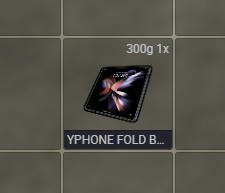
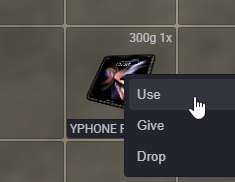
Buy a phone, find the device in your inventory, and use it to open the setup interface.
Phone in inventory
Opening the device
2
Complete the on-screen setup
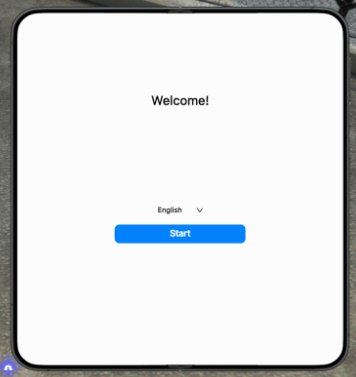
Follow the prompts to configure your phone and the options available for that particular device.
Initial phone setup
3
Set a passcode and review backups
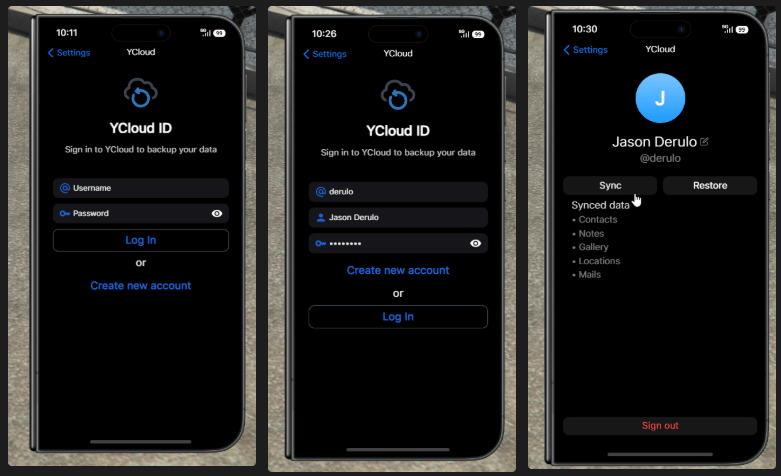
Protect the device with a passcode and familiarize yourself with its backup features before you begin storing important information.
Phone security and backups
4
Check your number, signal, and battery
Make sure the phone has the appropriate SIM, has enough charge, and is in an area with reception before relying on calls or connected apps.
Devices, Data, and Backups
Each phone is a distinct item rather than an interchangeable shortcut to one shared device. Depending on how you use it, a phone can hold messages, photographs, notes, applications, and other personal or business information.
Physical Ownership
Keep track of which phone you are carrying. Losing it, having it stolen, or handing it to someone else can affect who can access the device.
Passcode Protection
A passcode provides a layer of protection against unauthorized use. Don’t share it casually.
Backups
Use the phone’s backup options to protect supported data before replacing or changing devices.
Changing Phones
Moving your SIM preserves your number; it does not automatically mean every item of information on the old device transfers with it.
Before replacing or discarding a phone
Check that the information you want to keep has been backed up or transferred successfully. Keeping the same number and keeping the same device data are different things.
SIM Cards and Phone Numbers
A SIM card represents your phone number separately from the physical handset. If you obtain a new compatible phone, you can move your SIM to retain your existing number.
Item
What it controls
Phone device
The physical handset and its device-specific information
SIM card
The phone number associated with the SIM
Backup
Supported data available for restoration, depending on the backup system
If your character relies on a consistent number for customers, coworkers, or personal contacts, keep track of the SIM when replacing a phone.
Camera and Photos
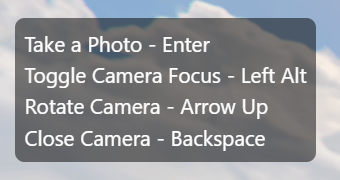
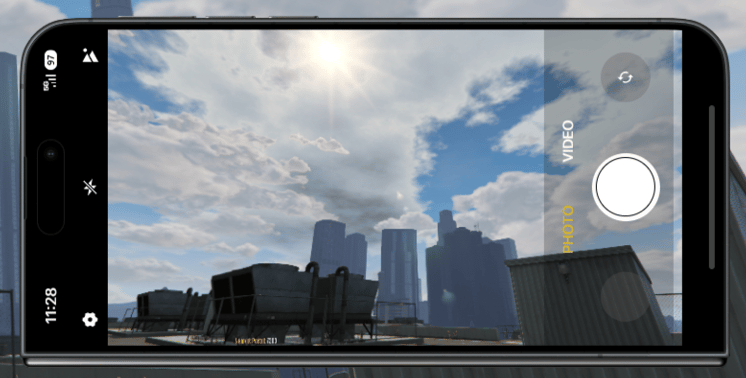
The phone camera can be used to document events, take personal photographs, create advertisements, or capture information for in-character purposes.
Camera controls
Control
Action
Left Alt
Move / freeze camera
Enter
Take a photo
Up Arrow
Rotate camera
Backspace
Close camera
Using the camera
Other Apps and Games
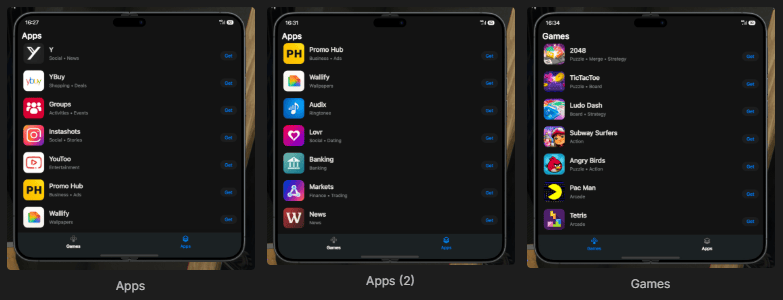
Available applications vary by the phone system and server configuration. Explore your installed apps for communication, utilities, entertainment, and in-character services.
Phone apps and games
Damage, Repairs, and Cases
Damaged Phones
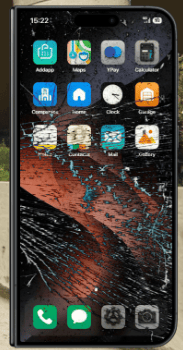
Serious falls, crashes, and other incidents may damage or disable a phone. If the device is damaged, visit the iFruit Store and speak with the repair technician to check your options.
iFruit phone repair
Do not discard a damaged phone before checking whether it can be repaired. A broken device may still be recoverable.
Phone Cases
Cases provide additional protection and are attached to the specific phone most recently used (your primary or last-used phone at the time of purchase).
A case is a one-time purchase for that device.
It remains assigned to the same device.
It does not transfer when you switch to another phone.
If you replace a lost phone, the replacement needs its own case.
Before purchasing a case, use the phone you want protected so that it is recognized as your primary device.
Battery and Charging
Phones need power to function. Plan for longer trips and periods away from the city, especially if you use the phone for directions, communications, or work.
Replacement Batteries
Battery supplies may be available from the iFruit Store or other supported vendors.
USB Charging
A USB cable can be used to charge your phone while traveling in a vehicle.
Keeping suitable charging supplies in your vehicle can help avoid losing access to the phone during a trip.
Reception and Signal Coverage
Phone service uses the city’s signal coverage. Reception is generally better in populated areas and can be weaker in remote or obstructed locations.Common problem areas may include rural regions, mountains, remote wilderness, underground spaces, and places far from cell towers.
Weak signal can interrupt services
Calls, texts, and connected applications may fail or become unavailable when coverage is poor. Return to an area with reception and try again.
Signal availability and battery charge are separate requirements: a powered phone can still lack reception.
Contacting Businesses and Services
Companies App
The Companies app lets you contact participating businesses without knowing an employee’s personal phone number. Depending on the business and staff availability, you can call or message the company through its listed contact options.Examples include restaurants, towing, automotive services, appointments, and general business inquiries.
A listed business may not always have an employee available to respond immediately. Use the company listing to contact the business rather than assuming an individual employee’s number is required.
Direct Service Numbers
Some services also have short numbers you can dial directly.
Service
Number
Police Departments
911
Ambulance
311
LS Customs — Towing
111
Craw Customs — Towing
211
The Fern
700
Pond Cafe
701
Save contacts your character frequently needs. You can also check the Companies app when you don’t know the correct number.
Financial Apps
Mobile Banking
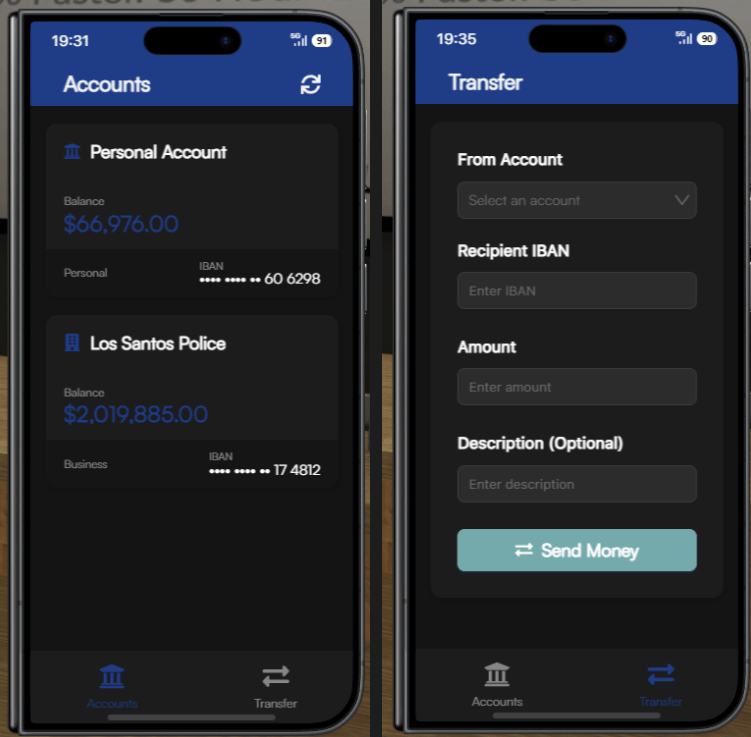
The mobile banking app provides access to supported everyday banking functions without requiring a visit to a bank branch.
Mobile banking
Account types, loans, savings, credit, and related restrictions are covered in greater detail in the Banking guide.
Stock Market
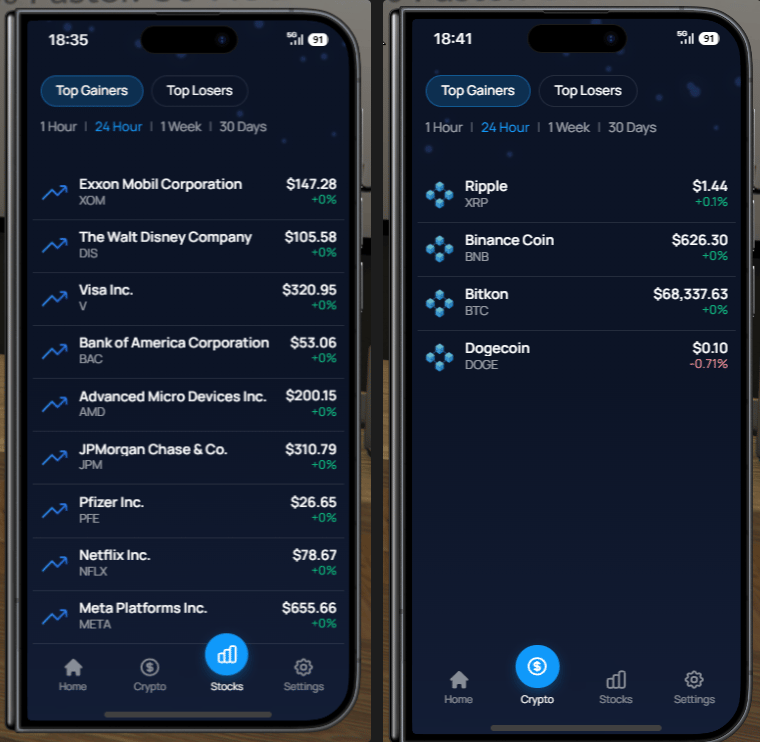
The Stock Market app lets you view and interact with the investment options made available in the phone system.
Stock Market app
Check the information shown inside the app before making a transaction. Prices and available functions can change.
RALLY: Live City Activity
RALLY is the phone’s location-based activity app. Unlike a standard social feed, it focuses on what is happening in the city now, including temporary events, open businesses, and available services.
What Appears on RALLY?
Car Meets
Current vehicle meets and gatherings.
Open Businesses
Businesses advertising that they are currently open.
Events
Community gatherings, competitions, parties, and other activities.
Hiring
Businesses advertising available work or recruitment activity.
Services
Services being offered around the city.
Public Alerts
Notices from authorized departments.
Finding Activity
Open RALLY and review currently listed activities. Listings may include a location that you can route to directly from the app.Because Rallies are temporary, the activity may end or change before you arrive. Check the listing for current information.
Creating a Rally
If your character is organizing an event or making a service available, you can create a Rally so others can find it.Suitable uses include car meets, public gatherings, hiring events, business openings, competitions, and services currently being offered.
Rallies are temporary
RALLY is intended for active, time-sensitive activity, not permanent business listings or long-term social posts. Keep the description and location relevant to what is actually taking place.
Common Questions
If I get a new phone, will I keep my number?
You can retain your number by moving your existing SIM card to another compatible device. This is separate from recovering or transferring stored phone data.
Does a case protect every phone I own?
No. Cases are tied to an individual phone, specifically your primary / last-used phone when the case is purchased.
What should I do if my phone breaks?
Keep the damaged device and check with the iFruit Store repair technician before disposing of it.
Why can't I call or use connected apps?
Check battery charge and signal coverage first. Remote or underground locations may have weak reception.
How do I reach a business without its number?
Open the Companies app, select the participating business, and use its available contact options.
What's the difference between RALLY and a social app?
RALLY focuses on temporary, location-based activity that is happening now rather than ordinary persistent social posts.
For day-to-day use: keep your phone charged, secure your device, maintain backups, and confirm you have reception when using connected services.
{"docsConfig":{"theme":"aspen","$schema":"https://mintlify.com/docs.json","name":"Equinox Roleplay User Guide","description":"The official Equinox Roleplay User Guide for getting started, server rules, public services, jobs, activities, and criminal roleplay.","colors":{"primary":"#DFAE1B","light":"#F9E155","dark":"#C79A13"},"logo":{"light":"https://mintcdn.com/equinox-roleplay/D2prCnRG4lBJO_Gt/images/RPLOGOCG2.png?fit=max\u0026auto=format\u0026n=D2prCnRG4lBJO_Gt\u0026q=85\u0026s=b4945375da98cc3f4dafcac827268804","dark":"https://mintcdn.com/equinox-roleplay/D2prCnRG4lBJO_Gt/images/RPLOGOCG2.png?fit=max\u0026auto=format\u0026n=D2prCnRG4lBJO_Gt\u0026q=85\u0026s=b4945375da98cc3f4dafcac827268804"},"favicon":{"light":"https://mintcdn.com/equinox-roleplay/D2prCnRG4lBJO_Gt/images/RPLOGOCG2.png?fit=max\u0026auto=format\u0026n=D2prCnRG4lBJO_Gt\u0026q=85\u0026s=b4945375da98cc3f4dafcac827268804","dark":"https://mintcdn.com/equinox-roleplay/D2prCnRG4lBJO_Gt/images/RPLOGOCG2.png?fit=max\u0026auto=format\u0026n=D2prCnRG4lBJO_Gt\u0026q=85\u0026s=b4945375da98cc3f4dafcac827268804"},"appearance":{"default":"dark"},"background":{"decoration":"gradient","color":{"light":"#FFFDF7","dark":"#000000"}},"navbar":{"links":[{"href":"https://discord.gg/equinoxroleplay","label":"Support"}],"primary":{"type":"button","label":"Join Discord","href":"https://discord.gg/equinoxroleplay"}},"footer":{"socials":{"youtube":"https://www.youtube.com/@EquinoxRoleplay","discord":"https://discord.gg/equinoxroleplay"}},"fonts":{"heading":{"family":"Lato"},"body":{"family":"Lato"}},"icons":{"library":"fontawesome"},"styling":{"codeblocks":"dark","latex":true},"banner":{"content":"Official Relaunch Set! November 28, 2026! JOIN US!","type":"info"},"contextual":{"options":["copy"],"display":"toc"},"thumbnails":{"appearance":"dark","background":"https://mintcdn.com/equinox-roleplay/WoXKKjdXBcDbKDdI/images/ERPserverbanner.png?fit=max\u0026auto=format\u0026n=WoXKKjdXBcDbKDdI\u0026q=85\u0026s=d893cceee90778b71911ca2662e8799f"},"metadata":{"timestamp":false},"navigation":{"pages":[]}},"deployment":{"deploymentMetadataValue":{"subdomain":"equinox-roleplay","hasAudioNarration":false,"actualSubdomain":"equinox-roleplay","customDomains":["docs.equinoxroleplay.com"],"gitSource":{"type":"github","owner":"freez3killztv","repo":"equinox-userguide","deployBranch":"main","contentDirectory":"","isPrivate":true,"mountPath":"","label":""},"entitlements":{"AI_CHAT":{"status":"DISABLED"}},"buildId":"6affbd816a49ae9d31332cc9","clientVersion":"0.0.4227","searchFilterCounts":[{"language":"default","tag":"Public Services","count":26},{"language":"default","tag":"Start Here","count":21},{"language":"default","tag":"Criminal Guide","count":12},{"language":"default","tag":"Welcome to Equinox","count":12},{"language":"default","tag":"Getting Started","count":9},{"language":"default","tag":"Department of Justice","count":9},{"language":"default","tag":"Robberies \u0026 Heists","count":7},{"language":"default","tag":"Bureau of Business Affairs","count":7},{"language":"default","tag":"Department of Public Safety","count":7},{"language":"default","tag":"Frequently Asked Questions","count":7}]},"assistantConfig":{"enableAskAiButton":false,"enableStarterQuestions":false,"enableContextualStarterQuestions":false,"enableAskAiSearchBar":true},"basePath":"","hasChatPermissions":false,"hasWebMcpPermissions":false,"toggles":[{"name":"kill-isr","enabled":true,"variant":{"name":"disabled","enabled":false,"feature_enabled":true},"impressionData":false},{"name":"custom-rbac-roles","enabled":true,"variant":{"name":"disabled","enabled":false,"feature_enabled":true},"impressionData":false},{"name":"agent-mintlify-slack","enabled":true,"variant":{"name":"disabled","enabled":false,"feature_enabled":true},"impressionData":false},{"name":"agent-integrations-settings","enabled":true,"variant":{"name":"disabled","enabled":false,"feature_enabled":true},"impressionData":false},{"name":"rbac-expansion","enabled":true,"variant":{"name":"disabled","enabled":false,"feature_enabled":true},"impressionData":false},{"name":"automations-pr-grouping","enabled":true,"variant":{"name":"disabled","enabled":false,"feature_enabled":true},"impressionData":false},{"name":"custom-prefix","enabled":true,"variant":{"name":"disabled","enabled":false,"feature_enabled":true},"impressionData":false},{"name":"analytics-v7","enabled":true,"variant":{"name":"disabled","enabled":false,"feature_enabled":true},"impressionData":false},{"name":"user-flows-analytics","enabled":true,"variant":{"name":"disabled","enabled":false,"feature_enabled":true},"impressionData":false},{"name":"no-publish-flow","enabled":true,"variant":{"name":"disabled","enabled":false,"feature_enabled":true},"impressionData":false},{"name":"workos-onboarding","enabled":true,"variant":{"name":"disabled","enabled":false,"feature_enabled":true},"impressionData":false},{"name":"snapshot-serving-live","enabled":true,"variant":{"name":"disabled","enabled":false,"feature_enabled":true},"impressionData":false},{"name":"stripTemperatureMiddleware","enabled":true,"variant":{"name":"disabled","enabled":false,"feature_enabled":true},"impressionData":false},{"name":"support-platform-pylon-zendesk","enabled":true,"variant":{"name":"disabled","enabled":false,"feature_enabled":true},"impressionData":false},{"name":"snapshot-serving","enabled":true,"variant":{"name":"disabled","enabled":false,"feature_enabled":true},"impressionData":false},{"name":"instant-rollback","enabled":true,"variant":{"name":"disabled","enabled":false,"feature_enabled":true},"impressionData":false},{"name":"granular-notifications-server","enabled":true,"variant":{"name":"disabled","enabled":false,"feature_enabled":true},"impressionData":false},{"name":"granular-notifications","enabled":true,"variant":{"name":"disabled","enabled":false,"feature_enabled":true},"impressionData":false},{"name":"automations-fable","enabled":true,"variant":{"name":"disabled","enabled":false,"feature_enabled":true},"impressionData":false},{"name":"fixed-ai-action-pricing","enabled":true,"variant":{"name":"disabled","enabled":false,"feature_enabled":true},"impressionData":false},{"name":"site-roles","enabled":true,"variant":{"name":"disabled","enabled":false,"feature_enabled":true},"impressionData":false},{"name":"automation-resolve-merge-conflict","enabled":true,"variant":{"name":"disabled","enabled":false,"feature_enabled":true},"impressionData":false},{"name":"scoped-publishing","enabled":true,"variant":{"name":"disabled","enabled":false,"feature_enabled":true},"impressionData":false},{"name":"mintql","enabled":true,"variant":{"name":"disabled","enabled":false,"feature_enabled":true},"impressionData":false},{"name":"page-level-analytics","enabled":true,"variant":{"name":"disabled","enabled":false,"feature_enabled":true},"impressionData":false},{"name":"editor-version-history-v2","enabled":true,"variant":{"name":"disabled","enabled":false,"feature_enabled":true},"impressionData":false},{"name":"billing-page-v2","enabled":true,"variant":{"name":"disabled","enabled":false,"feature_enabled":true},"impressionData":false},{"name":"full-page-search","enabled":true,"variant":{"name":"disabled","enabled":false,"feature_enabled":true},"impressionData":false},{"name":"workspace-projects","enabled":true,"variant":{"name":"disabled","enabled":false,"feature_enabled":true},"impressionData":false},{"name":"assistant-v5","enabled":true,"variant":{"name":"disabled","enabled":false,"feature_enabled":true},"impressionData":false},{"name":"fork-pr-previews","enabled":true,"variant":{"name":"disabled","enabled":false,"feature_enabled":true},"impressionData":false},{"name":"revalidation-jwt","enabled":true,"variant":{"name":"disabled","enabled":false,"feature_enabled":true},"impressionData":false},{"name":"workos-sso-scim","enabled":true,"variant":{"name":"disabled","enabled":false,"feature_enabled":true},"impressionData":false},{"name":"hobby-abuse-scan","enabled":true,"variant":{"name":"disabled","enabled":false,"feature_enabled":true},"impressionData":false},{"name":"dashboard-inbox","enabled":true,"variant":{"name":"disabled","enabled":false,"feature_enabled":true},"impressionData":false},{"name":"workos-signup","enabled":true,"variant":{"name":"disabled","enabled":false,"feature_enabled":true},"impressionData":false},{"name":"turbopuffer-dual-write","enabled":true,"variant":{"name":"disabled","enabled":false,"feature_enabled":true},"impressionData":false},{"name":"workos-enabled","enabled":true,"variant":{"name":"disabled","enabled":false,"feature_enabled":true},"impressionData":false},{"name":"approve-review-flow","enabled":true,"variant":{"name":"disabled","enabled":false,"feature_enabled":true},"impressionData":false},{"name":"editor-metadata","enabled":true,"variant":{"name":"disabled","enabled":false,"feature_enabled":true},"impressionData":false},{"name":"sso-setup-deadline-banner","enabled":true,"variant":{"name":"disabled","enabled":false,"feature_enabled":true},"impressionData":false},{"name":"turbopuffer-serve","enabled":true,"variant":{"name":"disabled","enabled":false,"feature_enabled":true},"impressionData":false},{"name":"live-agents","enabled":true,"variant":{"name":"disabled","enabled":false,"feature_enabled":true},"impressionData":false},{"name":"starter-pricing","enabled":true,"variant":{"name":"control","enabled":true,"payload":{"type":"string","value":"control"},"feature_enabled":true},"impressionData":false},{"name":"llms-txt-v2","enabled":true,"variant":{"name":"disabled","enabled":false,"feature_enabled":true},"impressionData":false},{"name":"wildcard-email-auth","enabled":true,"variant":{"name":"disabled","enabled":false,"feature_enabled":true},"impressionData":false}],"googleFontsInlined":true},"customCss":[]}
{"page":{"pagePath":"phone","slug":"/phone","pageMetadata":{"title":"Phone","icon":"mobile-screen-button","description":"Understand phones in Equinox Roleplay, including device setup, backups, SIM cards, repairs, charging, coverage, company contacts, mobile banking, and RALLY.","href":"/phone"},"description":{"compiledSource":"\"use strict\";\nconst {jsx: _jsx} = arguments[0];\nconst {useMDXComponents: _provideComponents} = arguments[0];\nfunction _createMdxContent(props) {\n const _components = {\n p: \"p\",\n ..._provideComponents(),\n ...props.components\n };\n return _jsx(_components.p, {\n children: \"Understand phones in Equinox Roleplay, including device setup, backups, SIM cards, repairs, charging, coverage, company contacts, mobile banking, and RALLY.\"\n });\n}\nfunction MDXContent(props = {}) {\n const {wrapper: MDXLayout} = {\n ..._provideComponents(),\n ...props.components\n };\n return MDXLayout ? _jsx(MDXLayout, {\n ...props,\n children: _jsx(_createMdxContent, {\n ...props\n })\n }) : _createMdxContent(props);\n}\nreturn {\n default: MDXContent\n};\n","frontmatter":{},"scope":{}},"pageType":"default","mdx":{"mdxSource":{"compiledSource":"\"use strict\";const{Fragment:_Fragment,jsx:_jsx,jsxs:_jsxs}=arguments[0];const{useMDXComponents:_provideComponents}=arguments[0];function _createMdxContent(props){const _components={a:`a`,code:`code`,hr:`hr`,li:`li`,p:`p`,strong:`strong`,tbody:`tbody`,td:`td`,th:`th`,thead:`thead`,tr:`tr`,ul:`ul`,..._provideComponents(),...props.components},{Accordion,AccordionGroup,Card,CardGroup,Frame,Heading,Info,Note,OptimizedImage,Step,Steps,Table,Tip,Warning}=_components;if(!Accordion)_missingMdxReference(`Accordion`,true);if(!AccordionGroup)_missingMdxReference(`AccordionGroup`,true);if(!Card)_missingMdxReference(`Card`,true);if(!CardGroup)_missingMdxReference(`CardGroup`,true);if(!Frame)_missingMdxReference(`Frame`,true);if(!Heading)_missingMdxReference(`Heading`,true);if(!Info)_missingMdxReference(`Info`,true);if(!Note)_missingMdxReference(`Note`,true);if(!OptimizedImage)_missingMdxReference(`OptimizedImage`,true);if(!Step)_missingMdxReference(`Step`,true);if(!Steps)_missingMdxReference(`Steps`,true);if(!Table)_missingMdxReference(`Table`,true);if(!Tip)_missingMdxReference(`Tip`,true);if(!Warning)_missingMdxReference(`Warning`,true);return _jsxs(_Fragment,{children:[_jsxs(_components.p,{children:[`Phones in `,_jsx(_components.strong,{children:`Equinox Roleplay`}),` are physical inventory items. Each device has its own information and settings, so changing phones, losing one, or allowing someone else to access it can have consequences.`]}),`\n`,_jsxs(_components.p,{children:[`Equinox uses the `,_jsx(_components.strong,{children:`YSeries`}),` phone system. You can explore its general interface through the `,_jsx(_components.a,{href:`https://www.teamsgg.dev/scripts/yseries`,children:`YSeries demonstration`}),` using `,_jsx(_components.strong,{children:`Try Now`}),`. Features and settings in Equinox may differ from the public demonstration.`]}),`\n`,_jsxs(Info,{children:[_jsx(Heading,{level:`3`,id:`three-things-to-understand`,children:`Three things to understand`}),_jsxs(_components.ul,{children:[`\n`,_jsxs(_components.li,{children:[_jsx(_components.strong,{children:`Phone:`}),` The physical device and its stored information.`]}),`\n`,_jsxs(_components.li,{children:[_jsx(_components.strong,{children:`SIM card:`}),` Your phone number, which can be moved to another compatible phone.`]}),`\n`,_jsxs(_components.li,{children:[_jsx(_components.strong,{children:`Backup:`}),` A way to protect supported information if you need to replace or restore a device.`]}),`\n`]})]}),`\n`,_jsx(_components.hr,{}),`\n`,_jsx(Heading,{level:`1`,id:`first-time-setup`,children:`First-Time Setup`}),`\n`,_jsxs(Steps,{children:[_jsxs(Step,{title:`Purchase and open a phone`,children:[_jsx(_components.p,{children:`Buy a phone, find the device in your inventory, and use it to open the setup interface.`}),_jsx(Frame,{caption:`Phone in inventory`,children:_jsx(OptimizedImage,{src:`https://mintcdn.com/equinox-roleplay/VzcmxkY403roN1cS/images/chrome_WDAZkFGJ4p.png?fit=max\u0026auto=format\u0026n=VzcmxkY403roN1cS\u0026q=85\u0026s=6e31c5e39f54e0cc7c1a7eb8c443ab92`,alt:`Phone available in the inventory`,\"data-og-width\":`225`,width:`225`,\"data-og-height\":`193`,height:`193`,\"data-path\":`images/chrome_WDAZkFGJ4p.png`,\"data-optimize\":`true`,\"data-opv\":`3`,srcset:`https://mintcdn.com/equinox-roleplay/VzcmxkY403roN1cS/images/chrome_WDAZkFGJ4p.png?w=280\u0026fit=max\u0026auto=format\u0026n=VzcmxkY403roN1cS\u0026q=85\u0026s=7e17d0f34b15f1bfd2128f703a896866 280w, https://mintcdn.com/equinox-roleplay/VzcmxkY403roN1cS/images/chrome_WDAZkFGJ4p.png?w=560\u0026fit=max\u0026auto=format\u0026n=VzcmxkY403roN1cS\u0026q=85\u0026s=dc390055964181a95c15f556194ac150 560w, https://mintcdn.com/equinox-roleplay/VzcmxkY403roN1cS/images/chrome_WDAZkFGJ4p.png?w=840\u0026fit=max\u0026auto=format\u0026n=VzcmxkY403roN1cS\u0026q=85\u0026s=948f55f98780084db91a3a0f1a1fe15c 840w, https://mintcdn.com/equinox-roleplay/VzcmxkY403roN1cS/images/chrome_WDAZkFGJ4p.png?w=1100\u0026fit=max\u0026auto=format\u0026n=VzcmxkY403roN1cS\u0026q=85\u0026s=8e3568406b33d5e28a893de8493b9767 1100w, https://mintcdn.com/equinox-roleplay/VzcmxkY403roN1cS/images/chrome_WDAZkFGJ4p.png?w=1650\u0026fit=max\u0026auto=format\u0026n=VzcmxkY403roN1cS\u0026q=85\u0026s=03ba8bee6fd3473b23ef2da8271ecf46 1650w, https://mintcdn.com/equinox-roleplay/VzcmxkY403roN1cS/images/chrome_WDAZkFGJ4p.png?w=2500\u0026fit=max\u0026auto=format\u0026n=VzcmxkY403roN1cS\u0026q=85\u0026s=8d6b1e5439bcaac199b71a377e20f0c8 2500w`})}),_jsx(Frame,{caption:`Opening the device`,children:_jsx(OptimizedImage,{src:`https://mintcdn.com/equinox-roleplay/VzcmxkY403roN1cS/images/chrome_JQttCfw2S7.png?fit=max\u0026auto=format\u0026n=VzcmxkY403roN1cS\u0026q=85\u0026s=41289e4f2dec8b86a3117802b7be02b5`,alt:`Opening a new phone`,\"data-og-width\":`235`,width:`235`,\"data-og-height\":`182`,height:`182`,\"data-path\":`images/chrome_JQttCfw2S7.png`,\"data-optimize\":`true`,\"data-opv\":`3`,srcset:`https://mintcdn.com/equinox-roleplay/VzcmxkY403roN1cS/images/chrome_JQttCfw2S7.png?w=280\u0026fit=max\u0026auto=format\u0026n=VzcmxkY403roN1cS\u0026q=85\u0026s=bfbc5d9ff70dbea6104431d231793f61 280w, https://mintcdn.com/equinox-roleplay/VzcmxkY403roN1cS/images/chrome_JQttCfw2S7.png?w=560\u0026fit=max\u0026auto=format\u0026n=VzcmxkY403roN1cS\u0026q=85\u0026s=6c0c5fcaa41eebfa6512a9b287378554 560w, https://mintcdn.com/equinox-roleplay/VzcmxkY403roN1cS/images/chrome_JQttCfw2S7.png?w=840\u0026fit=max\u0026auto=format\u0026n=VzcmxkY403roN1cS\u0026q=85\u0026s=e4905de5feedcbd764b5a1da138c9a26 840w, https://mintcdn.com/equinox-roleplay/VzcmxkY403roN1cS/images/chrome_JQttCfw2S7.png?w=1100\u0026fit=max\u0026auto=format\u0026n=VzcmxkY403roN1cS\u0026q=85\u0026s=a669a48ea3e7aa679a1e047a1b1e12a1 1100w, https://mintcdn.com/equinox-roleplay/VzcmxkY403roN1cS/images/chrome_JQttCfw2S7.png?w=1650\u0026fit=max\u0026auto=format\u0026n=VzcmxkY403roN1cS\u0026q=85\u0026s=62e5da1882cbdbf0ac7f306466e5f05b 1650w, https://mintcdn.com/equinox-roleplay/VzcmxkY403roN1cS/images/chrome_JQttCfw2S7.png?w=2500\u0026fit=max\u0026auto=format\u0026n=VzcmxkY403roN1cS\u0026q=85\u0026s=16dec585de4643278d2e503eb17a3946 2500w`})})]}),_jsxs(Step,{title:`Complete the on-screen setup`,children:[_jsx(_components.p,{children:`Follow the prompts to configure your phone and the options available for that particular device.`}),_jsx(Frame,{caption:`Initial phone setup`,children:_jsx(OptimizedImage,{src:`https://mintcdn.com/equinox-roleplay/VzcmxkY403roN1cS/images/chrome_IpoPZYTQk6.png?fit=max\u0026auto=format\u0026n=VzcmxkY403roN1cS\u0026q=85\u0026s=a4db6f34941017ac101a2e462c53f46f`,alt:`Initial phone setup screen`,\"data-og-width\":`356`,width:`356`,\"data-og-height\":`377`,height:`377`,\"data-path\":`images/chrome_IpoPZYTQk6.png`,\"data-optimize\":`true`,\"data-opv\":`3`,srcset:`https://mintcdn.com/equinox-roleplay/VzcmxkY403roN1cS/images/chrome_IpoPZYTQk6.png?w=280\u0026fit=max\u0026auto=format\u0026n=VzcmxkY403roN1cS\u0026q=85\u0026s=c5538625886e1c4184824b0d69b12b63 280w, https://mintcdn.com/equinox-roleplay/VzcmxkY403roN1cS/images/chrome_IpoPZYTQk6.png?w=560\u0026fit=max\u0026auto=format\u0026n=VzcmxkY403roN1cS\u0026q=85\u0026s=e82198c7664c296e5276cf64c3041d49 560w, https://mintcdn.com/equinox-roleplay/VzcmxkY403roN1cS/images/chrome_IpoPZYTQk6.png?w=840\u0026fit=max\u0026auto=format\u0026n=VzcmxkY403roN1cS\u0026q=85\u0026s=fb8c83d75ef829f659778adbb2f9a235 840w, https://mintcdn.com/equinox-roleplay/VzcmxkY403roN1cS/images/chrome_IpoPZYTQk6.png?w=1100\u0026fit=max\u0026auto=format\u0026n=VzcmxkY403roN1cS\u0026q=85\u0026s=31fe1ff60b1d6731e1e58310cc7a92ea 1100w, https://mintcdn.com/equinox-roleplay/VzcmxkY403roN1cS/images/chrome_IpoPZYTQk6.png?w=1650\u0026fit=max\u0026auto=format\u0026n=VzcmxkY403roN1cS\u0026q=85\u0026s=fa1603dc8a6481bed279ec31c72b4052 1650w, https://mintcdn.com/equinox-roleplay/VzcmxkY403roN1cS/images/chrome_IpoPZYTQk6.png?w=2500\u0026fit=max\u0026auto=format\u0026n=VzcmxkY403roN1cS\u0026q=85\u0026s=03e3b590bf5f04580163bcf88523ea81 2500w`})})]}),_jsxs(Step,{title:`Set a passcode and review backups`,children:[_jsx(_components.p,{children:`Protect the device with a passcode and familiarize yourself with its backup features before you begin storing important information.`}),_jsx(Frame,{caption:`Phone security and backups`,children:_jsx(OptimizedImage,{src:`https://mintcdn.com/equinox-roleplay/VzcmxkY403roN1cS/images/chrome_RiY45nbmYq.png?fit=max\u0026auto=format\u0026n=VzcmxkY403roN1cS\u0026q=85\u0026s=d65df9ac7893c83271531d22fd5c7def`,alt:`Phone security and backup options`,\"data-og-width\":`781`,width:`781`,\"data-og-height\":`476`,height:`476`,\"data-path\":`images/chrome_RiY45nbmYq.png`,\"data-optimize\":`true`,\"data-opv\":`3`,srcset:`https://mintcdn.com/equinox-roleplay/VzcmxkY403roN1cS/images/chrome_RiY45nbmYq.png?w=280\u0026fit=max\u0026auto=format\u0026n=VzcmxkY403roN1cS\u0026q=85\u0026s=9e051342027f3b39cbf8da62075ce10d 280w, https://mintcdn.com/equinox-roleplay/VzcmxkY403roN1cS/images/chrome_RiY45nbmYq.png?w=560\u0026fit=max\u0026auto=format\u0026n=VzcmxkY403roN1cS\u0026q=85\u0026s=8d1a25b6284118ffe8c01a634e13c960 560w, https://mintcdn.com/equinox-roleplay/VzcmxkY403roN1cS/images/chrome_RiY45nbmYq.png?w=840\u0026fit=max\u0026auto=format\u0026n=VzcmxkY403roN1cS\u0026q=85\u0026s=0f83a45c0873295be84811e60134acf2 840w, https://mintcdn.com/equinox-roleplay/VzcmxkY403roN1cS/images/chrome_RiY45nbmYq.png?w=1100\u0026fit=max\u0026auto=format\u0026n=VzcmxkY403roN1cS\u0026q=85\u0026s=a76865abb3c1dc84fb043083f067db05 1100w, https://mintcdn.com/equinox-roleplay/VzcmxkY403roN1cS/images/chrome_RiY45nbmYq.png?w=1650\u0026fit=max\u0026auto=format\u0026n=VzcmxkY403roN1cS\u0026q=85\u0026s=a74207a46e285a573d00c48d334471d5 1650w, https://mintcdn.com/equinox-roleplay/VzcmxkY403roN1cS/images/chrome_RiY45nbmYq.png?w=2500\u0026fit=max\u0026auto=format\u0026n=VzcmxkY403roN1cS\u0026q=85\u0026s=5b0a68d0e94911ad896965d5fdc6b042 2500w`})})]}),_jsx(Step,{title:`Check your number, signal, and battery`,children:_jsx(_components.p,{children:`Make sure the phone has the appropriate SIM, has enough charge, and is in an area with reception before relying on calls or connected apps.`})})]}),`\n`,_jsx(_components.hr,{}),`\n`,_jsx(Heading,{level:`1`,id:`devices-data-and-backups`,children:`Devices, Data, and Backups`}),`\n`,_jsx(_components.p,{children:`Each phone is a distinct item rather than an interchangeable shortcut to one shared device. Depending on how you use it, a phone can hold messages, photographs, notes, applications, and other personal or business information.`}),`\n`,_jsxs(CardGroup,{cols:2,children:[_jsx(Card,{title:`Physical Ownership`,icon:`smartphone`,children:_jsx(_components.p,{children:`Keep track of which phone you are carrying. Losing it, having it stolen, or handing it to someone else can affect who can access the device.`})}),_jsx(Card,{title:`Passcode Protection`,icon:`lock-keyhole`,children:_jsx(_components.p,{children:`A passcode provides a layer of protection against unauthorized use. Don’t share it casually.`})}),_jsx(Card,{title:`Backups`,icon:`cloud-upload`,children:_jsx(_components.p,{children:`Use the phone’s backup options to protect supported data before replacing or changing devices.`})}),_jsx(Card,{title:`Changing Phones`,icon:`arrow-left-right`,children:_jsx(_components.p,{children:`Moving your SIM preserves your number; it does not automatically mean every item of information on the old device transfers with it.`})})]}),`\n`,_jsxs(Warning,{children:[_jsx(Heading,{level:`3`,id:`before-replacing-or-discarding-a-phone`,children:`Before replacing or discarding a phone`}),_jsxs(_components.p,{children:[`Check that the information you want to keep has been backed up or transferred successfully. `,_jsx(_components.strong,{children:`Keeping the same number and keeping the same device data are different things.`})]})]}),`\n`,_jsx(_components.hr,{}),`\n`,_jsx(Heading,{level:`1`,id:`sim-cards-and-phone-numbers`,children:`SIM Cards and Phone Numbers`}),`\n`,_jsxs(_components.p,{children:[`A `,_jsx(_components.strong,{children:`SIM card`}),` represents your phone number separately from the physical handset. If you obtain a new compatible phone, you can move your SIM to retain your existing number.`]}),`\n`,_jsxs(Table,{children:[_jsx(_components.thead,{children:_jsxs(_components.tr,{children:[_jsx(_components.th,{children:`Item`}),_jsx(_components.th,{children:`What it controls`})]})}),_jsxs(_components.tbody,{children:[_jsxs(_components.tr,{children:[_jsx(_components.td,{children:_jsx(_components.strong,{children:`Phone device`})}),_jsx(_components.td,{children:`The physical handset and its device-specific information`})]}),_jsxs(_components.tr,{children:[_jsx(_components.td,{children:_jsx(_components.strong,{children:`SIM card`})}),_jsx(_components.td,{children:`The phone number associated with the SIM`})]}),_jsxs(_components.tr,{children:[_jsx(_components.td,{children:_jsx(_components.strong,{children:`Backup`})}),_jsx(_components.td,{children:`Supported data available for restoration, depending on the backup system`})]})]})]}),`\n`,_jsx(Tip,{children:_jsx(_components.p,{children:`If your character relies on a consistent number for customers, coworkers, or personal contacts, keep track of the SIM when replacing a phone.`})}),`\n`,_jsx(_components.hr,{}),`\n`,_jsx(Heading,{level:`1`,id:`camera-and-photos`,children:`Camera and Photos`}),`\n`,_jsx(_components.p,{children:`The phone camera can be used to document events, take personal photographs, create advertisements, or capture information for in-character purposes.`}),`\n`,_jsx(Frame,{caption:`Camera controls`,children:_jsx(OptimizedImage,{src:`https://mintcdn.com/equinox-roleplay/VzcmxkY403roN1cS/images/chrome_adJGPSLLjP.png?fit=max\u0026auto=format\u0026n=VzcmxkY403roN1cS\u0026q=85\u0026s=f8cc604f8a31b29ad3ea230bb8f4726a`,alt:`Phone camera controls`,\"data-og-width\":`340`,width:`340`,\"data-og-height\":`180`,height:`180`,\"data-path\":`images/chrome_adJGPSLLjP.png`,\"data-optimize\":`true`,\"data-opv\":`3`,srcset:`https://mintcdn.com/equinox-roleplay/VzcmxkY403roN1cS/images/chrome_adJGPSLLjP.png?w=280\u0026fit=max\u0026auto=format\u0026n=VzcmxkY403roN1cS\u0026q=85\u0026s=c3aa5d4c1594211740a6ceb3ddf550bc 280w, https://mintcdn.com/equinox-roleplay/VzcmxkY403roN1cS/images/chrome_adJGPSLLjP.png?w=560\u0026fit=max\u0026auto=format\u0026n=VzcmxkY403roN1cS\u0026q=85\u0026s=ac0051bf461613de565116f409038c8e 560w, https://mintcdn.com/equinox-roleplay/VzcmxkY403roN1cS/images/chrome_adJGPSLLjP.png?w=840\u0026fit=max\u0026auto=format\u0026n=VzcmxkY403roN1cS\u0026q=85\u0026s=ac0ba4600367a45e3fb77978def7f91b 840w, https://mintcdn.com/equinox-roleplay/VzcmxkY403roN1cS/images/chrome_adJGPSLLjP.png?w=1100\u0026fit=max\u0026auto=format\u0026n=VzcmxkY403roN1cS\u0026q=85\u0026s=defddfcf4d6622e02ac98cd925fedf5e 1100w, https://mintcdn.com/equinox-roleplay/VzcmxkY403roN1cS/images/chrome_adJGPSLLjP.png?w=1650\u0026fit=max\u0026auto=format\u0026n=VzcmxkY403roN1cS\u0026q=85\u0026s=0a07b2e4ee6a0bb17f25905af9fdfda9 1650w, https://mintcdn.com/equinox-roleplay/VzcmxkY403roN1cS/images/chrome_adJGPSLLjP.png?w=2500\u0026fit=max\u0026auto=format\u0026n=VzcmxkY403roN1cS\u0026q=85\u0026s=a43ae01ba2c436471ec5e0f392def044 2500w`})}),`\n`,_jsxs(Table,{children:[_jsx(_components.thead,{children:_jsxs(_components.tr,{children:[_jsx(_components.th,{children:`Control`}),_jsx(_components.th,{children:`Action`})]})}),_jsxs(_components.tbody,{children:[_jsxs(_components.tr,{children:[_jsx(_components.td,{children:_jsx(_components.strong,{children:`Left Alt`})}),_jsx(_components.td,{children:`Move / freeze camera`})]}),_jsxs(_components.tr,{children:[_jsx(_components.td,{children:_jsx(_components.strong,{children:`Enter`})}),_jsx(_components.td,{children:`Take a photo`})]}),_jsxs(_components.tr,{children:[_jsx(_components.td,{children:_jsx(_components.strong,{children:`Up Arrow`})}),_jsx(_components.td,{children:`Rotate camera`})]}),_jsxs(_components.tr,{children:[_jsx(_components.td,{children:_jsx(_components.strong,{children:`Backspace`})}),_jsx(_components.td,{children:`Close camera`})]})]})]}),`\n`,_jsx(Frame,{caption:`Using the camera`,children:_jsx(OptimizedImage,{src:`https://mintcdn.com/equinox-roleplay/VzcmxkY403roN1cS/images/chrome_1ZwIahAQkQ.png?fit=max\u0026auto=format\u0026n=VzcmxkY403roN1cS\u0026q=85\u0026s=c9a74e9ad17a848e8cb3a9574cc96f4b`,alt:`Taking a photo using the phone camera`,\"data-og-width\":`746`,width:`746`,\"data-og-height\":`378`,height:`378`,\"data-path\":`images/chrome_1ZwIahAQkQ.png`,\"data-optimize\":`true`,\"data-opv\":`3`,srcset:`https://mintcdn.com/equinox-roleplay/VzcmxkY403roN1cS/images/chrome_1ZwIahAQkQ.png?w=280\u0026fit=max\u0026auto=format\u0026n=VzcmxkY403roN1cS\u0026q=85\u0026s=2844543b6fd646efb526377ad25f4000 280w, https://mintcdn.com/equinox-roleplay/VzcmxkY403roN1cS/images/chrome_1ZwIahAQkQ.png?w=560\u0026fit=max\u0026auto=format\u0026n=VzcmxkY403roN1cS\u0026q=85\u0026s=3952dd342d31ef16dad63d79b6c40572 560w, https://mintcdn.com/equinox-roleplay/VzcmxkY403roN1cS/images/chrome_1ZwIahAQkQ.png?w=840\u0026fit=max\u0026auto=format\u0026n=VzcmxkY403roN1cS\u0026q=85\u0026s=3b7ee968ec2442d88681a2aafa38c3b2 840w, https://mintcdn.com/equinox-roleplay/VzcmxkY403roN1cS/images/chrome_1ZwIahAQkQ.png?w=1100\u0026fit=max\u0026auto=format\u0026n=VzcmxkY403roN1cS\u0026q=85\u0026s=799eb70de937d383ae7e4a2efb4b08b4 1100w, https://mintcdn.com/equinox-roleplay/VzcmxkY403roN1cS/images/chrome_1ZwIahAQkQ.png?w=1650\u0026fit=max\u0026auto=format\u0026n=VzcmxkY403roN1cS\u0026q=85\u0026s=90b60cbce5fc594092ebb4db6516fd3a 1650w, https://mintcdn.com/equinox-roleplay/VzcmxkY403roN1cS/images/chrome_1ZwIahAQkQ.png?w=2500\u0026fit=max\u0026auto=format\u0026n=VzcmxkY403roN1cS\u0026q=85\u0026s=aa3c881c059e0ae3f0fd2ab35c3ef572 2500w`})}),`\n`,_jsx(Heading,{level:`2`,id:`other-apps-and-games`,children:`Other Apps and Games`}),`\n`,_jsx(_components.p,{children:`Available applications vary by the phone system and server configuration. Explore your installed apps for communication, utilities, entertainment, and in-character services.`}),`\n`,_jsx(Frame,{caption:`Phone apps and games`,children:_jsx(OptimizedImage,{src:`https://mintcdn.com/equinox-roleplay/VzcmxkY403roN1cS/images/chrome_ziJrcwjrMD.png?fit=max\u0026auto=format\u0026n=VzcmxkY403roN1cS\u0026q=85\u0026s=caec28693bd6fb48f53694abfb87e459`,alt:`Phone applications and games`,\"data-og-width\":`783`,width:`783`,\"data-og-height\":`300`,height:`300`,\"data-path\":`images/chrome_ziJrcwjrMD.png`,\"data-optimize\":`true`,\"data-opv\":`3`,srcset:`https://mintcdn.com/equinox-roleplay/VzcmxkY403roN1cS/images/chrome_ziJrcwjrMD.png?w=280\u0026fit=max\u0026auto=format\u0026n=VzcmxkY403roN1cS\u0026q=85\u0026s=c77d9c8cbb110102aa66debc2b37660c 280w, https://mintcdn.com/equinox-roleplay/VzcmxkY403roN1cS/images/chrome_ziJrcwjrMD.png?w=560\u0026fit=max\u0026auto=format\u0026n=VzcmxkY403roN1cS\u0026q=85\u0026s=a9ee499c3ab07c5ab8e646ac3017fe9e 560w, https://mintcdn.com/equinox-roleplay/VzcmxkY403roN1cS/images/chrome_ziJrcwjrMD.png?w=840\u0026fit=max\u0026auto=format\u0026n=VzcmxkY403roN1cS\u0026q=85\u0026s=5aa63df84da3b1b5af9a708b0295532b 840w, https://mintcdn.com/equinox-roleplay/VzcmxkY403roN1cS/images/chrome_ziJrcwjrMD.png?w=1100\u0026fit=max\u0026auto=format\u0026n=VzcmxkY403roN1cS\u0026q=85\u0026s=88f87d5e358a5e546d9ce3ba61ef2f09 1100w, https://mintcdn.com/equinox-roleplay/VzcmxkY403roN1cS/images/chrome_ziJrcwjrMD.png?w=1650\u0026fit=max\u0026auto=format\u0026n=VzcmxkY403roN1cS\u0026q=85\u0026s=a23cce5b527eada692c1b53f7d647089 1650w, https://mintcdn.com/equinox-roleplay/VzcmxkY403roN1cS/images/chrome_ziJrcwjrMD.png?w=2500\u0026fit=max\u0026auto=format\u0026n=VzcmxkY403roN1cS\u0026q=85\u0026s=3cab7d180e685e950142fbbf527b32ac 2500w`})}),`\n`,_jsx(_components.hr,{}),`\n`,_jsx(Heading,{level:`1`,id:`damage-repairs-and-cases`,children:`Damage, Repairs, and Cases`}),`\n`,_jsx(Heading,{level:`2`,id:`damaged-phones`,children:`Damaged Phones`}),`\n`,_jsxs(_components.p,{children:[`Serious falls, crashes, and other incidents may damage or disable a phone. If the device is damaged, visit the `,_jsx(_components.strong,{children:`iFruit Store`}),` and speak with the repair technician to check your options.`]}),`\n`,_jsx(Frame,{caption:`iFruit phone repair`,children:_jsx(OptimizedImage,{src:`https://mintcdn.com/equinox-roleplay/VzcmxkY403roN1cS/images/chrome_csrLQ6Xdvp.png?fit=max\u0026auto=format\u0026n=VzcmxkY403roN1cS\u0026q=85\u0026s=12d3ea278cbf4136e8d4d1b9f869f65d`,alt:`Phone repair technician at the iFruit Store`,\"data-og-width\":`183`,width:`183`,\"data-og-height\":`350`,height:`350`,\"data-path\":`images/chrome_csrLQ6Xdvp.png`,\"data-optimize\":`true`,\"data-opv\":`3`,srcset:`https://mintcdn.com/equinox-roleplay/VzcmxkY403roN1cS/images/chrome_csrLQ6Xdvp.png?w=280\u0026fit=max\u0026auto=format\u0026n=VzcmxkY403roN1cS\u0026q=85\u0026s=08d6dcd11789d71ea8ca61b517300349 280w, https://mintcdn.com/equinox-roleplay/VzcmxkY403roN1cS/images/chrome_csrLQ6Xdvp.png?w=560\u0026fit=max\u0026auto=format\u0026n=VzcmxkY403roN1cS\u0026q=85\u0026s=5a428263e31628751b49af0c75ca64cb 560w, https://mintcdn.com/equinox-roleplay/VzcmxkY403roN1cS/images/chrome_csrLQ6Xdvp.png?w=840\u0026fit=max\u0026auto=format\u0026n=VzcmxkY403roN1cS\u0026q=85\u0026s=73297d701b4e6b6312860a8aec8fc411 840w, https://mintcdn.com/equinox-roleplay/VzcmxkY403roN1cS/images/chrome_csrLQ6Xdvp.png?w=1100\u0026fit=max\u0026auto=format\u0026n=VzcmxkY403roN1cS\u0026q=85\u0026s=8bc6981f6c17e518096d798b03989a3b 1100w, https://mintcdn.com/equinox-roleplay/VzcmxkY403roN1cS/images/chrome_csrLQ6Xdvp.png?w=1650\u0026fit=max\u0026auto=format\u0026n=VzcmxkY403roN1cS\u0026q=85\u0026s=6756bc1d854298edd9ad08ee9b6e8067 1650w, https://mintcdn.com/equinox-roleplay/VzcmxkY403roN1cS/images/chrome_csrLQ6Xdvp.png?w=2500\u0026fit=max\u0026auto=format\u0026n=VzcmxkY403roN1cS\u0026q=85\u0026s=ed45b08a90d8d45b7363c8ee78ed9c9f 2500w`})}),`\n`,_jsx(Warning,{children:_jsxs(_components.p,{children:[_jsx(_components.strong,{children:`Do not discard a damaged phone before checking whether it can be repaired.`}),` A broken device may still be recoverable.`]})}),`\n`,_jsx(Heading,{level:`2`,id:`phone-cases`,children:`Phone Cases`}),`\n`,_jsxs(_components.p,{children:[`Cases provide additional protection and are attached to `,_jsx(_components.strong,{children:`the specific phone most recently used`}),` (your primary or last-used phone at the time of purchase).`]}),`\n`,_jsxs(_components.ul,{children:[`\n`,_jsxs(_components.li,{children:[`A case is a `,_jsx(_components.strong,{children:`one-time purchase for that device`}),`.`]}),`\n`,_jsx(_components.li,{children:`It remains assigned to the same device.`}),`\n`,_jsxs(_components.li,{children:[`It `,_jsx(_components.strong,{children:`does not transfer`}),` when you switch to another phone.`]}),`\n`,_jsx(_components.li,{children:`If you replace a lost phone, the replacement needs its own case.`}),`\n`]}),`\n`,_jsx(Note,{children:_jsx(_components.p,{children:`Before purchasing a case, use the phone you want protected so that it is recognized as your primary device.`})}),`\n`,_jsx(_components.hr,{}),`\n`,_jsx(Heading,{level:`1`,id:`battery-and-charging`,children:`Battery and Charging`}),`\n`,_jsx(_components.p,{children:`Phones need power to function. Plan for longer trips and periods away from the city, especially if you use the phone for directions, communications, or work.`}),`\n`,_jsxs(CardGroup,{cols:2,children:[_jsx(Card,{title:`Replacement Batteries`,icon:`battery-bolt`,children:_jsxs(_components.p,{children:[`Battery supplies may be available from the `,_jsx(_components.strong,{children:`iFruit Store`}),` or other supported vendors.`]})}),_jsx(Card,{title:`USB Charging`,icon:`input-pipe`,iconType:`regular`,children:_jsx(_components.p,{children:`A USB cable can be used to charge your phone while traveling in a vehicle.`})})]}),`\n`,_jsx(Tip,{children:_jsx(_components.p,{children:`Keeping suitable charging supplies in your vehicle can help avoid losing access to the phone during a trip.`})}),`\n`,_jsx(_components.hr,{}),`\n`,_jsx(Heading,{level:`1`,id:`reception-and-signal-coverage`,children:`Reception and Signal Coverage`}),`\n`,_jsx(_components.p,{children:`Phone service uses the city’s signal coverage. Reception is generally better in populated areas and can be weaker in remote or obstructed locations.`}),`\n`,_jsx(_components.p,{children:`Common problem areas may include rural regions, mountains, remote wilderness, underground spaces, and places far from cell towers.`}),`\n`,_jsxs(Warning,{children:[_jsx(Heading,{level:`3`,id:`weak-signal-can-interrupt-services`,children:`Weak signal can interrupt services`}),_jsx(_components.p,{children:`Calls, texts, and connected applications may fail or become unavailable when coverage is poor. Return to an area with reception and try again.`})]}),`\n`,_jsx(_components.p,{children:`Signal availability and battery charge are separate requirements: a powered phone can still lack reception.`}),`\n`,_jsx(_components.hr,{}),`\n`,_jsx(Heading,{level:`1`,id:`contacting-businesses-and-services`,children:`Contacting Businesses and Services`}),`\n`,_jsx(Heading,{level:`2`,id:`companies-app`,children:`Companies App`}),`\n`,_jsxs(_components.p,{children:[`The `,_jsx(_components.strong,{children:`Companies`}),` app lets you contact participating businesses without knowing an employee’s personal phone number. Depending on the business and staff availability, you can call or message the company through its listed contact options.`]}),`\n`,_jsx(_components.p,{children:`Examples include restaurants, towing, automotive services, appointments, and general business inquiries.`}),`\n`,_jsx(Note,{children:_jsx(_components.p,{children:`A listed business may not always have an employee available to respond immediately. Use the company listing to contact the business rather than assuming an individual employee’s number is required.`})}),`\n`,_jsx(Heading,{level:`2`,id:`direct-service-numbers`,children:`Direct Service Numbers`}),`\n`,_jsx(_components.p,{children:`Some services also have short numbers you can dial directly.`}),`\n`,_jsxs(Table,{children:[_jsx(_components.thead,{children:_jsxs(_components.tr,{children:[_jsx(_components.th,{children:`Service`}),_jsx(_components.th,{style:{textAlign:`center`},children:`Number`})]})}),_jsxs(_components.tbody,{children:[_jsxs(_components.tr,{children:[_jsx(_components.td,{children:_jsx(_components.strong,{children:`Police Departments`})}),_jsx(_components.td,{\"data-numeric\":`true`,style:{textAlign:`center`},children:_jsx(_components.code,{children:`911`})})]}),_jsxs(_components.tr,{children:[_jsx(_components.td,{children:_jsx(_components.strong,{children:`Ambulance`})}),_jsx(_components.td,{\"data-numeric\":`true`,style:{textAlign:`center`},children:_jsx(_components.code,{children:`311`})})]}),_jsxs(_components.tr,{children:[_jsx(_components.td,{children:_jsx(_components.strong,{children:`LS Customs — Towing`})}),_jsx(_components.td,{\"data-numeric\":`true`,style:{textAlign:`center`},children:_jsx(_components.code,{children:`111`})})]}),_jsxs(_components.tr,{children:[_jsx(_components.td,{children:_jsx(_components.strong,{children:`Craw Customs — Towing`})}),_jsx(_components.td,{\"data-numeric\":`true`,style:{textAlign:`center`},children:_jsx(_components.code,{children:`211`})})]}),_jsxs(_components.tr,{children:[_jsx(_components.td,{children:_jsx(_components.strong,{children:`The Fern`})}),_jsx(_components.td,{\"data-numeric\":`true`,style:{textAlign:`center`},children:_jsx(_components.code,{children:`700`})})]}),_jsxs(_components.tr,{children:[_jsx(_components.td,{children:_jsx(_components.strong,{children:`Pond Cafe`})}),_jsx(_components.td,{\"data-numeric\":`true`,style:{textAlign:`center`},children:_jsx(_components.code,{children:`701`})})]})]})]}),`\n`,_jsx(Tip,{children:_jsx(_components.p,{children:`Save contacts your character frequently needs. You can also check the Companies app when you don’t know the correct number.`})}),`\n`,_jsx(_components.hr,{}),`\n`,_jsx(Heading,{level:`1`,id:`financial-apps`,children:`Financial Apps`}),`\n`,_jsx(Heading,{level:`2`,id:`mobile-banking`,children:`Mobile Banking`}),`\n`,_jsx(_components.p,{children:`The mobile banking app provides access to supported everyday banking functions without requiring a visit to a bank branch.`}),`\n`,_jsx(Frame,{caption:`Mobile banking`,children:_jsx(OptimizedImage,{src:`https://mintcdn.com/equinox-roleplay/VzcmxkY403roN1cS/images/chrome_oUCne2Lpfp.png?fit=max\u0026auto=format\u0026n=VzcmxkY403roN1cS\u0026q=85\u0026s=edcc8dabd12f704e654425b395afbdad`,alt:`Mobile banking application`,\"data-og-width\":`751`,width:`751`,\"data-og-height\":`737`,height:`737`,\"data-path\":`images/chrome_oUCne2Lpfp.png`,\"data-optimize\":`true`,\"data-opv\":`3`,srcset:`https://mintcdn.com/equinox-roleplay/VzcmxkY403roN1cS/images/chrome_oUCne2Lpfp.png?w=280\u0026fit=max\u0026auto=format\u0026n=VzcmxkY403roN1cS\u0026q=85\u0026s=da92a2cf737a91cf2ae5cb70841d52c5 280w, https://mintcdn.com/equinox-roleplay/VzcmxkY403roN1cS/images/chrome_oUCne2Lpfp.png?w=560\u0026fit=max\u0026auto=format\u0026n=VzcmxkY403roN1cS\u0026q=85\u0026s=5ea853d87ad3d5a97309bae0ed58c3ee 560w, https://mintcdn.com/equinox-roleplay/VzcmxkY403roN1cS/images/chrome_oUCne2Lpfp.png?w=840\u0026fit=max\u0026auto=format\u0026n=VzcmxkY403roN1cS\u0026q=85\u0026s=7a429f87a5cedc7aff7d6f9f287e7359 840w, https://mintcdn.com/equinox-roleplay/VzcmxkY403roN1cS/images/chrome_oUCne2Lpfp.png?w=1100\u0026fit=max\u0026auto=format\u0026n=VzcmxkY403roN1cS\u0026q=85\u0026s=529b2a2999c696fbf425b1f3b39413d5 1100w, https://mintcdn.com/equinox-roleplay/VzcmxkY403roN1cS/images/chrome_oUCne2Lpfp.png?w=1650\u0026fit=max\u0026auto=format\u0026n=VzcmxkY403roN1cS\u0026q=85\u0026s=8045131eeab626d635c0e1c02b8bcbd9 1650w, https://mintcdn.com/equinox-roleplay/VzcmxkY403roN1cS/images/chrome_oUCne2Lpfp.png?w=2500\u0026fit=max\u0026auto=format\u0026n=VzcmxkY403roN1cS\u0026q=85\u0026s=8558592cc3e7f38b0727710725a5e99e 2500w`})}),`\n`,_jsxs(_components.p,{children:[`Account types, loans, savings, credit, and related restrictions are covered in greater detail in the `,_jsx(_components.strong,{children:`Banking`}),` guide.`]}),`\n`,_jsx(Heading,{level:`2`,id:`stock-market`,children:`Stock Market`}),`\n`,_jsxs(_components.p,{children:[`The `,_jsx(_components.strong,{children:`Stock Market`}),` app lets you view and interact with the investment options made available in the phone system.`]}),`\n`,_jsx(Frame,{caption:`Stock Market app`,children:_jsx(OptimizedImage,{src:`https://mintcdn.com/equinox-roleplay/VzcmxkY403roN1cS/images/chrome_5GHYpQiwyT.png?fit=max\u0026auto=format\u0026n=VzcmxkY403roN1cS\u0026q=85\u0026s=701eb351e859ead8de0d800f1b3f8e2f`,alt:`Stock Market application`,\"data-og-width\":`760`,width:`760`,\"data-og-height\":`742`,height:`742`,\"data-path\":`images/chrome_5GHYpQiwyT.png`,\"data-optimize\":`true`,\"data-opv\":`3`,srcset:`https://mintcdn.com/equinox-roleplay/VzcmxkY403roN1cS/images/chrome_5GHYpQiwyT.png?w=280\u0026fit=max\u0026auto=format\u0026n=VzcmxkY403roN1cS\u0026q=85\u0026s=3f8b292f85ad0cb871d8554d1a55464f 280w, https://mintcdn.com/equinox-roleplay/VzcmxkY403roN1cS/images/chrome_5GHYpQiwyT.png?w=560\u0026fit=max\u0026auto=format\u0026n=VzcmxkY403roN1cS\u0026q=85\u0026s=332ef9a43bab1452ff8e1cdf9a0c8132 560w, https://mintcdn.com/equinox-roleplay/VzcmxkY403roN1cS/images/chrome_5GHYpQiwyT.png?w=840\u0026fit=max\u0026auto=format\u0026n=VzcmxkY403roN1cS\u0026q=85\u0026s=0e791e3f887d3b8945f41d9b0415855a 840w, https://mintcdn.com/equinox-roleplay/VzcmxkY403roN1cS/images/chrome_5GHYpQiwyT.png?w=1100\u0026fit=max\u0026auto=format\u0026n=VzcmxkY403roN1cS\u0026q=85\u0026s=5c87803c6d4a8637b33d8923c748e90e 1100w, https://mintcdn.com/equinox-roleplay/VzcmxkY403roN1cS/images/chrome_5GHYpQiwyT.png?w=1650\u0026fit=max\u0026auto=format\u0026n=VzcmxkY403roN1cS\u0026q=85\u0026s=dd92ac4d53dcc3889702645c1d9be6ab 1650w, https://mintcdn.com/equinox-roleplay/VzcmxkY403roN1cS/images/chrome_5GHYpQiwyT.png?w=2500\u0026fit=max\u0026auto=format\u0026n=VzcmxkY403roN1cS\u0026q=85\u0026s=6772ee2abe03a8756cdec5aaa90b77c0 2500w`})}),`\n`,_jsx(Note,{children:_jsx(_components.p,{children:`Check the information shown inside the app before making a transaction. Prices and available functions can change.`})}),`\n`,_jsx(_components.hr,{}),`\n`,_jsx(Heading,{level:`1`,id:`rally-live-city-activity`,children:`RALLY: Live City Activity`}),`\n`,_jsxs(_components.p,{children:[_jsx(_components.strong,{children:`RALLY`}),` is the phone’s location-based activity app. Unlike a standard social feed, it focuses on `,_jsx(_components.strong,{children:`what is happening in the city now`}),`, including temporary events, open businesses, and available services.`]}),`\n`,_jsx(Heading,{level:`2`,id:`what-appears-on-rally`,children:`What Appears on RALLY?`}),`\n`,_jsxs(CardGroup,{cols:2,children:[_jsx(Card,{title:`Car Meets`,icon:`car-front`,children:_jsx(_components.p,{children:`Current vehicle meets and gatherings.`})}),_jsx(Card,{title:`Open Businesses`,icon:`store`,children:_jsx(_components.p,{children:`Businesses advertising that they are currently open.`})}),_jsx(Card,{title:`Events`,icon:`calendar-days`,children:_jsx(_components.p,{children:`Community gatherings, competitions, parties, and other activities.`})}),_jsx(Card,{title:`Hiring`,icon:`briefcase-business`,children:_jsx(_components.p,{children:`Businesses advertising available work or recruitment activity.`})}),_jsx(Card,{title:`Services`,icon:`wrench`,children:_jsx(_components.p,{children:`Services being offered around the city.`})}),_jsx(Card,{title:`Public Alerts`,icon:`megaphone`,children:_jsx(_components.p,{children:`Notices from authorized departments.`})})]}),`\n`,_jsx(Heading,{level:`2`,id:`finding-activity`,children:`Finding Activity`}),`\n`,_jsxs(_components.p,{children:[`Open RALLY and review currently listed activities. Listings may include a location that you can `,_jsx(_components.strong,{children:`route to directly from the app`}),`.`]}),`\n`,_jsx(_components.p,{children:`Because Rallies are temporary, the activity may end or change before you arrive. Check the listing for current information.`}),`\n`,_jsx(Heading,{level:`2`,id:`creating-a-rally`,children:`Creating a Rally`}),`\n`,_jsx(_components.p,{children:`If your character is organizing an event or making a service available, you can create a Rally so others can find it.`}),`\n`,_jsx(_components.p,{children:`Suitable uses include car meets, public gatherings, hiring events, business openings, competitions, and services currently being offered.`}),`\n`,_jsxs(Info,{children:[_jsx(Heading,{level:`3`,id:`rallies-are-temporary`,children:`Rallies are temporary`}),_jsxs(_components.p,{children:[`RALLY is intended for `,_jsx(_components.strong,{children:`active, time-sensitive activity`}),`, not permanent business listings or long-term social posts. Keep the description and location relevant to what is actually taking place.`]})]}),`\n`,_jsx(_components.hr,{}),`\n`,_jsx(Heading,{level:`1`,id:`common-questions`,children:`Common Questions`}),`\n`,_jsxs(AccordionGroup,{children:[_jsx(Accordion,{title:`If I get a new phone, will I keep my number?`,id:`if-i-get-a-new-phone-will-i-keep-my-number`,children:_jsx(_components.p,{children:`You can retain your number by moving your existing SIM card to another compatible device. This is separate from recovering or transferring stored phone data.`})}),_jsx(Accordion,{title:`Does a case protect every phone I own?`,id:`does-a-case-protect-every-phone-i-own`,children:_jsx(_components.p,{children:`No. Cases are tied to an individual phone, specifically your primary / last-used phone when the case is purchased.`})}),_jsx(Accordion,{title:`What should I do if my phone breaks?`,id:`what-should-i-do-if-my-phone-breaks`,children:_jsx(_components.p,{children:`Keep the damaged device and check with the iFruit Store repair technician before disposing of it.`})}),_jsx(Accordion,{title:`Why can't I call or use connected apps?`,id:`why-cant-i-call-or-use-connected-apps`,children:_jsx(_components.p,{children:`Check battery charge and signal coverage first. Remote or underground locations may have weak reception.`})}),_jsx(Accordion,{title:`How do I reach a business without its number?`,id:`how-do-i-reach-a-business-without-its-number`,children:_jsx(_components.p,{children:`Open the Companies app, select the participating business, and use its available contact options.`})}),_jsx(Accordion,{title:`What's the difference between RALLY and a social app?`,id:`whats-the-difference-between-rally-and-a-social-app`,children:_jsx(_components.p,{children:`RALLY focuses on temporary, location-based activity that is happening now rather than ordinary persistent social posts.`})})]}),`\n`,_jsx(_components.hr,{}),`\n`,_jsx(Info,{children:_jsxs(_components.p,{children:[_jsx(_components.strong,{children:`For day-to-day use:`}),` keep your phone charged, secure your device, maintain backups, and confirm you have reception when using connected services.`]})})]})}function MDXContent(props={}){const{wrapper:MDXLayout}={..._provideComponents(),...props.components};return MDXLayout?_jsx(MDXLayout,{...props,children:_jsx(_createMdxContent,{...props})}):_createMdxContent(props)}return{default:MDXContent};function _missingMdxReference(id,component){throw new Error(`Expected `+(component?`component`:`object`)+\" `\"+id+\"` to be defined: you likely forgot to import, pass, or provide it.\")}","frontmatter":{},"scope":{"codeStyling":"dark","config":{},"pageMetadata":{"title":"Phone","icon":"mobile-screen-button","description":"Understand phones in Equinox Roleplay, including device setup, backups, SIM cards, repairs, charging, coverage, company contacts, mobile banking, and RALLY.","href":"/phone"}}},"mdxSourceWithNoJs":null},"mdxExtracts":{"tableOfContents":[{"title":"Three things to understand","slug":"three-things-to-understand","depth":3,"children":[]},{"title":"First-Time Setup","slug":"first-time-setup","depth":1,"children":[]},{"title":"Devices, Data, and Backups","slug":"devices-data-and-backups","depth":1,"children":[{"title":"Before replacing or discarding a phone","slug":"before-replacing-or-discarding-a-phone","depth":3,"children":[]}]},{"title":"SIM Cards and Phone Numbers","slug":"sim-cards-and-phone-numbers","depth":1,"children":[]},{"title":"Camera and Photos","slug":"camera-and-photos","depth":1,"children":[]},{"title":"Other Apps and Games","slug":"other-apps-and-games","depth":2,"children":[]},{"title":"Damage, Repairs, and Cases","slug":"damage-repairs-and-cases","depth":1,"children":[]},{"title":"Damaged Phones","slug":"damaged-phones","depth":2,"children":[]},{"title":"Phone Cases","slug":"phone-cases","depth":2,"children":[]},{"title":"Battery and Charging","slug":"battery-and-charging","depth":1,"children":[]},{"title":"Reception and Signal Coverage","slug":"reception-and-signal-coverage","depth":1,"children":[{"title":"Weak signal can interrupt services","slug":"weak-signal-can-interrupt-services","depth":3,"children":[]}]},{"title":"Contacting Businesses and Services","slug":"contacting-businesses-and-services","depth":1,"children":[]},{"title":"Companies App","slug":"companies-app","depth":2,"children":[]},{"title":"Direct Service Numbers","slug":"direct-service-numbers","depth":2,"children":[]},{"title":"Financial Apps","slug":"financial-apps","depth":1,"children":[]},{"title":"Mobile Banking","slug":"mobile-banking","depth":2,"children":[]},{"title":"Stock Market","slug":"stock-market","depth":2,"children":[]},{"title":"RALLY: Live City Activity","slug":"rally-live-city-activity","depth":1,"children":[]},{"title":"What Appears on RALLY?","slug":"what-appears-on-rally","depth":2,"children":[]},{"title":"Finding Activity","slug":"finding-activity","depth":2,"children":[]},{"title":"Creating a Rally","slug":"creating-a-rally","depth":2,"children":[{"title":"Rallies are temporary","slug":"rallies-are-temporary","depth":3,"children":[]}]},{"title":"Common Questions","slug":"common-questions","depth":1,"children":[]}],"codeExamples":{}},"jsLinks":[],"subdomain":"equinox-roleplay","siteName":"Equinox Roleplay User Guide","title":"Phone - Equinox Roleplay User Guide","navMaps":{"firstHrefInVersion":{},"firstHrefInLanguage":{}},"lastModified":"2026-10-10T02:28:27.437Z","originalFileLocation":"phone.mdx"},"headHtml":"\u003cscript data-mint-head>(function(){var d=document.documentElement,p=null;if(!p){try{p=localStorage.getItem(\"isDarkMode\")}catch(e){}if(p==='true')p='dark';else if(p==='false')p='light';if(p!=='light'\u0026\u0026p!=='dark'\u0026\u0026p!=='system')p=\"dark\"}var r=p==='system'?(matchMedia(\"(prefers-color-scheme: dark)\").matches?'dark':'light'):p;d.classList.remove(r==='dark'?'light':'dark');d.classList.add(r);d.setAttribute(\"data-theme-preference\",p)})();\u003c/script>\u003cmeta data-mint-head name=\"description\" content=\"Understand phones in Equinox Roleplay, including device setup, backups, SIM cards, repairs, charging, coverage, company contacts, mobile banking, and RALLY.\">\u003cmeta data-mint-head name=\"application-name\" content=\"Equinox Roleplay User Guide\">\u003cmeta data-mint-head name=\"generator\" content=\"Mintlify\">\u003clink data-mint-head rel=\"icon\" type=\"image/png\" sizes=\"192x192\" href=\"/mintlify-assets/_mintlify/favicons/equinox-roleplay/mZyxIYWyeIAfV3cp/_generated/favicon/android-chrome-192x192.png\" media=\"(prefers-color-scheme: light)\">\u003clink data-mint-head rel=\"apple-touch-icon\" type=\"image/png\" sizes=\"180x180\" href=\"/mintlify-assets/_mintlify/favicons/equinox-roleplay/mZyxIYWyeIAfV3cp/_generated/favicon/apple-touch-icon.png\">\u003clink data-mint-head rel=\"icon\" type=\"image/png\" sizes=\"16x16\" href=\"/mintlify-assets/_mintlify/favicons/equinox-roleplay/mZyxIYWyeIAfV3cp/_generated/favicon/favicon-16x16.png\" media=\"(prefers-color-scheme: light)\">\u003clink data-mint-head rel=\"icon\" type=\"image/png\" sizes=\"32x32\" href=\"/mintlify-assets/_mintlify/favicons/equinox-roleplay/mZyxIYWyeIAfV3cp/_generated/favicon/favicon-32x32.png\" media=\"(prefers-color-scheme: light)\">\u003clink data-mint-head rel=\"shortcut icon\" type=\"image/x-icon\" href=\"/mintlify-assets/_mintlify/favicons/equinox-roleplay/mZyxIYWyeIAfV3cp/_generated/favicon/favicon.ico\" media=\"(prefers-color-scheme: light)\">\u003clink data-mint-head rel=\"icon\" type=\"image/png\" sizes=\"192x192\" href=\"/mintlify-assets/_mintlify/favicons/equinox-roleplay/mZyxIYWyeIAfV3cp/_generated/favicon-dark/android-chrome-192x192.png\" media=\"(prefers-color-scheme: dark)\">\u003clink data-mint-head rel=\"icon\" type=\"image/png\" sizes=\"16x16\" href=\"/mintlify-assets/_mintlify/favicons/equinox-roleplay/mZyxIYWyeIAfV3cp/_generated/favicon-dark/favicon-16x16.png\" media=\"(prefers-color-scheme: dark)\">\u003clink data-mint-head rel=\"icon\" type=\"image/png\" sizes=\"32x32\" href=\"/mintlify-assets/_mintlify/favicons/equinox-roleplay/mZyxIYWyeIAfV3cp/_generated/favicon-dark/favicon-32x32.png\" media=\"(prefers-color-scheme: dark)\">\u003clink data-mint-head rel=\"shortcut icon\" type=\"image/x-icon\" href=\"/mintlify-assets/_mintlify/favicons/equinox-roleplay/mZyxIYWyeIAfV3cp/_generated/favicon-dark/favicon.ico\" media=\"(prefers-color-scheme: dark)\">\u003cmeta data-mint-head property=\"og:title\" content=\"Phone - Equinox Roleplay User Guide\">\u003cmeta data-mint-head property=\"og:description\" content=\"Understand phones in Equinox Roleplay, including device setup, backups, SIM cards, repairs, charging, coverage, company contacts, mobile banking, and RALLY.\">\u003cmeta data-mint-head property=\"og:site_name\" content=\"Equinox Roleplay User Guide\">\u003cmeta data-mint-head property=\"og:url\" content=\"https://docs.equinoxroleplay.com/phone\">\u003cmeta data-mint-head property=\"og:type\" content=\"website\">\u003cmeta data-mint-head property=\"og:image\" content=\"https://equinox-roleplay.mintlify.site/_mintlify/api/og/v2?division=Getting+Started\u0026amp;title=Phone\u0026amp;description=Understand+phones+in+Equinox+Roleplay%2C+including+device+setup%2C+backups%2C+SIM+cards%2C+repairs%2C+charging%2C+coverage%2C+company+contacts%2C+mobile+banking%2C+and+RALLY.\u0026amp;theme=9e0ef7c1ff4668451e81c1a3\u0026amp;signature=ee74b43237d6dc964ddec7f4d5588e5cb41daa41120cab3780d64c8bbe228ebd\">\u003cmeta data-mint-head property=\"og:image:width\" content=\"1200\">\u003cmeta data-mint-head property=\"og:image:height\" content=\"630\">\u003cmeta data-mint-head name=\"twitter:card\" content=\"summary_large_image\">\u003cmeta data-mint-head name=\"twitter:title\" content=\"Phone - Equinox Roleplay User Guide\">\u003cmeta data-mint-head name=\"twitter:description\" content=\"Understand phones in Equinox Roleplay, including device setup, backups, SIM cards, repairs, charging, coverage, company contacts, mobile banking, and RALLY.\">\u003cmeta data-mint-head name=\"twitter:image\" content=\"https://equinox-roleplay.mintlify.site/_mintlify/api/og/v2?division=Getting+Started\u0026amp;title=Phone\u0026amp;description=Understand+phones+in+Equinox+Roleplay%2C+including+device+setup%2C+backups%2C+SIM+cards%2C+repairs%2C+charging%2C+coverage%2C+company+contacts%2C+mobile+banking%2C+and+RALLY.\u0026amp;theme=9e0ef7c1ff4668451e81c1a3\u0026amp;signature=ee74b43237d6dc964ddec7f4d5588e5cb41daa41120cab3780d64c8bbe228ebd\">\u003cmeta data-mint-head name=\"twitter:image:width\" content=\"1200\">\u003cmeta data-mint-head name=\"twitter:image:height\" content=\"630\">\u003cmeta data-mint-head name=\"msapplication-config\" content=\"/mintlify-assets/_mintlify/favicons/equinox-roleplay/mZyxIYWyeIAfV3cp/_generated/favicon/browserconfig.xml\">\u003cmeta data-mint-head name=\"apple-mobile-web-app-title\" content=\"Equinox Roleplay User Guide\">\u003cmeta data-mint-head name=\"msapplication-TileColor\" content=\"#DFAE1B\">\u003clink data-mint-head rel=\"canonical\" href=\"https://docs.equinoxroleplay.com/phone\">\u003clink data-mint-head rel=\"alternate\" type=\"application/xml\" href=\"/sitemap.xml\">\u003clink data-mint-head rel=\"alternate\" type=\"text/markdown\" href=\"/phone.md\">\u003cscript data-mint-head type=\"application/ld+json\">{\"@context\":\"https://schema.org\",\"@graph\":[{\"@type\":\"Organization\",\"@id\":\"https://docs.equinoxroleplay.com/#organization\",\"name\":\"Equinox Roleplay User Guide\",\"url\":\"https://docs.equinoxroleplay.com\",\"logo\":{\"@type\":\"ImageObject\",\"url\":\"https://mintcdn.com/equinox-roleplay/D2prCnRG4lBJO_Gt/images/RPLOGOCG2.png?fit=max\u0026auto=format\u0026n=D2prCnRG4lBJO_Gt\u0026q=85\u0026s=b4945375da98cc3f4dafcac827268804\"}},{\"@type\":\"WebSite\",\"@id\":\"https://docs.equinoxroleplay.com#website\",\"name\":\"Equinox Roleplay User Guide\",\"url\":\"https://docs.equinoxroleplay.com\",\"publisher\":{\"@id\":\"https://docs.equinoxroleplay.com/#organization\"}},{\"@type\":\"WebPage\",\"@id\":\"https://docs.equinoxroleplay.com/phone#webpage\",\"url\":\"https://docs.equinoxroleplay.com/phone\",\"name\":\"Phone\",\"description\":\"Understand phones in Equinox Roleplay, including device setup, backups, SIM cards, repairs, charging, coverage, company contacts, mobile banking, and RALLY.\",\"dateModified\":\"2026-10-10T02:28:27.437Z\",\"isPartOf\":{\"@id\":\"https://docs.equinoxroleplay.com#website\"},\"breadcrumb\":{\"@id\":\"https://docs.equinoxroleplay.com/phone#breadcrumb\"}},{\"@type\":\"BreadcrumbList\",\"@id\":\"https://docs.equinoxroleplay.com/phone#breadcrumb\",\"itemListElement\":[{\"@type\":\"ListItem\",\"position\":1,\"name\":\"Getting Started\",\"item\":\"https://docs.equinoxroleplay.com/character-creation\"},{\"@type\":\"ListItem\",\"position\":2,\"name\":\"Phone\",\"item\":\"https://docs.equinoxroleplay.com/phone\"}]},{\"@type\":[\"Article\",\"TechArticle\"],\"@id\":\"https://docs.equinoxroleplay.com/phone#article\",\"headline\":\"Phone\",\"name\":\"Phone\",\"description\":\"Understand phones in Equinox Roleplay, including device setup, backups, SIM cards, repairs, charging, coverage, company contacts, mobile banking, and RALLY.\",\"url\":\"https://docs.equinoxroleplay.com/phone\",\"mainEntityOfPage\":{\"@id\":\"https://docs.equinoxroleplay.com/phone#webpage\"},\"dateModified\":\"2026-10-10T02:28:27.437Z\",\"publisher\":{\"@id\":\"https://docs.equinoxroleplay.com/#organization\"},\"isPartOf\":{\"@id\":\"https://docs.equinoxroleplay.com#website\"}}]}\u003c/script>\u003cscript data-mint-head type=\"application/ld+json\">{\"@context\":\"https://schema.org\",\"@type\":\"WebSite\",\"name\":\"Equinox Roleplay User Guide\",\"publisher\":{\"@type\":\"Organization\",\"name\":\"Equinox Roleplay User Guide\"},\"provider\":{\"@type\":\"Organization\",\"name\":\"Mintlify\",\"url\":\"https://mintlify.com\"}}\u003c/script>","agentPointerHref":"/phone.md","siteName":"Equinox Roleplay User Guide","nav":{"global":null,"tabs":[{"tab":"Start Here","icon":"sparkles","groups":[{"group":"Welcome to Equinox","icon":"sun","pages":[{"title":"Welcome","icon":"sparkles","href":"/welcome"},{"title":"Connecting to the Server","icon":"wifi","href":"/connect"},{"title":"Streaming, Creators \u0026 Support","icon":"signal-stream","href":"/streaming"},{"group":"Frequently Asked Questions","icon":"question","pages":[{"title":"Frequently Asked Questions","icon":"circle-question","href":"/faq"},{"title":"General Questions","icon":"users","href":"/faq/general"},{"title":"Characters \u0026 Roleplay","icon":{"name":"user-circle","style":"regular","library":"fontawesome"},"href":"/faq/characters-and-roleplay"},{"title":"Jobs, Economy \u0026 Businesses","icon":{"name":"briefcase-blank","style":"regular","library":"fontawesome"},"href":"/faq/jobs-and-economy"},{"title":"Crime \u0026 Emergency Services","icon":"shield","href":"/faq/crime-and-emergency-services"},{"title":"Rules \u0026 Player Support","icon":{"name":"user-gear","style":"regular","library":"fontawesome"},"href":"/faq/rules-and-support"},{"title":"Technical Troubleshooting","icon":"question","href":"/faq/tech-troubleshoot"}]},{"title":"Official Relaunch \u0026 Data Reset","icon":"rotate","href":"/user-reset"},{"title":"Change Logs","icon":"dev","sidebarTitle":"Change Logs","href":"/changes"}]},{"group":"Getting Started","icon":"star","pages":[{"title":"Character Creation","icon":"user","description":"Learn how to create and select characters in Equinox Roleplay, customize your appearance and selection screen, choose a spawn, and keep character stories separate.","href":"/character-creation"},{"title":"Phone","icon":"mobile-screen-button","href":"/phone"},{"title":"Banking","icon":"building-columns","description":"Understand bank accounts, transfers, savings, shared access, loans, credit scores, vehicle financing, and account restrictions in Equinox Roleplay.","href":"/banking"},{"title":"Starter Apartment","icon":"building","href":"/starter-apartment"},{"title":"Storage Units","icon":"warehouse","href":"/storage-units"},{"title":"Insurance","icon":"id-card","href":"/insurance"},{"title":"Laptops","icon":"laptop","href":"/laptops"},{"title":"Crafting","icon":"toolbox","href":"/crafting"},{"title":"Other Goodies","icon":"star","href":"/other-goodies"}]}]},{"tab":"Rules","icon":"scale-balanced","pages":[{"title":"Rules","href":"/equinox-rules-official"}]},{"tab":"Public Services","icon":"landmark","pages":[{"title":"Public Services","href":"/los-santos-police"}]},{"tab":"Player Guide","icon":"book-open","pages":[{"title":"Player Guide","href":"/civilian-jobs"}]},{"tab":"Criminal Guide","icon":"masks-theater","pages":[{"title":"Criminal Guide","href":"/criminal-guide"}]}]},"basePath":"","title":"Phone - Equinox Roleplay User Guide","deploymentId":"dpl_vSEmv961Ncyvz1psVwgUnTXQMSYk","buildId":"dpl_vSEmv961Ncyvz1psVwgUnTXQMSYk","dynamics":["07c022d89b","a74be98ba7"],"chunks":["Frame-BRsfsIIG.js","DynamicMarkdown-NFqqduU7.js","zoom-image-lightbox-BguUeq2N.js","lightbox-handle-r17bVUz3.js"]}